
Surface Area of Cube and Cuboid
Loading the math board and drawing, please wait…
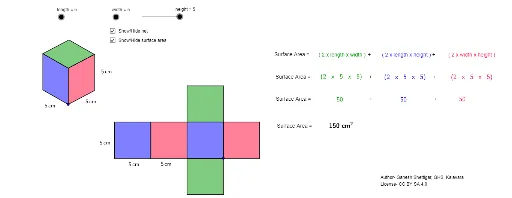
This example demonstrates the calculation and visualization of surface areas for cubes and cuboids. It involves core mathematical concepts such as area calculation, three-dimensional shapes, and spatial transformations. Key GeoGebra commands and objects used in the construction include Vector, Translate, Polygon, Line, Intersect, and Midpoint to build the geometric solids and their surface areas. Suitable for middle school students and above to learn about solid geometry and surface area concepts.
GeoGebra Commands & Parameters
Vector(A, B) → uVector(A, C) → vVector(A, D) → wTranslate(E, Vector[(height * u)]) → E'Vector(E, E') → zTranslate(E, Vector[(width * w)]) → E'_1Translate(E, Vector[(length * v)]) → E'_2Translate(E'_2, Vector[(height * u)]) → FTranslate(E'_1, Vector[(height * u)]) → GPolygon(F, E'_2, E, E') → poly1, f, e'_2, e, e'Polygon(E, E'_1, G, E') → poly2, e_1, e'_1, g, e'_3Line(F, g) → dLine(G, e') → hIntersect(d, h) → HPolygon(F, E', G, H) → poly3, f_1, e'_4, g_1, h_1Polygon(J, I, K, L) → poly4, j, i, k, lPolygon(N, J, I, M) → poly5, n, j_1, i_1, mPolygon(N, P, O, M) → poly6, n_1, p, o, m_1Polygon(Q, R, N, J) → poly7, q, r, n_2, j_2Polygon(T, S, I, M) → poly8, t, s, i_2, m_2Polygon(V, U, O, P) → poly9, v_1, u_1, o_1, p_1Midpoint(e'_2) → WMidpoint(e_1) → ZMidpoint(e'_1) → A_1Midpoint(v_1) → B_1Midpoint(u_1) → C_1Midpoint(o) → D_1Midpoint(m_2) → E_1Midpoint(t) → F_1