
Super Symmetry in Geometry
Loading the math board and drawing, please wait…
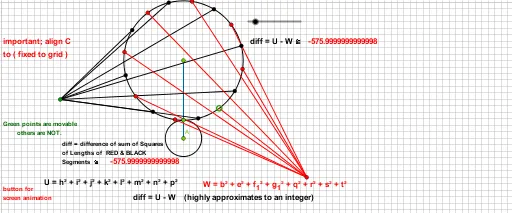
This example demonstrates super symmetry in geometry. It involves concepts such as symmetry, geometric transformations, and circles. Using GeoGebra commands like Circle, Point, Line, Rotate, etc., it constructs symmetric geometric figures. Suitable for high school mathematics education and learning.
GeoGebra Commands & Parameters
Circle(A, a) → cPoint(c) → BLine(A, B) → fPoint(f) → CSegment(A, C) → gCircle(C, g - a) → dPoint(d) → DRotate(D, 22.5°, C) → D'Angle(D, C, D') → αRotate(D', 22.5°, C) → D''Angle(D', C, D'') → βRotate(D'', 22.5°, C) → D'''Angle(D'', C, D''') → γRotate(D''', 22.5°, C) → EAngle(D''', C, E) → δRotate(E, 22.5°, C) → E'Angle(E, C, E') → εRotate(E', 22.5°, C) → E''Angle(E', C, E'') → ζRotate(E'', 22.5°, C) → E'''Angle(E'', C, E''') → ηRotate(E''', 22.5°, C) → FAngle(E''', C, F) → θRotate(F, 22.5°, C) → F'Angle(F, C, F') → ιRotate(F', 22.5°, C) → F''Angle(F', C, F'') → κRotate(F'', 22.5°, C) → F'''Angle(F'', C, F''') → λRotate(F''', 22.5°, C) → GAngle(F''', C, G) → μRotate(G, 22.5°, C) → G'Angle(G, C, G') → νRotate(G', 22.5°, C) → G''Angle(G', C, G'') → ξRotate(G'', 22.5°, C) → G'''Angle(G'', C, G''') → οMirror(H, A) → H'Segment(D', H) → hSegment(G''', H) → iSegment(G', H) → jSegment(F''', H) → kSegment(F', H) → lSegment(E''', H) → mSegment(E', H) → nSegment(D''', H) → pSegment(D, H') → qSegment(G'', H') → rSegment(G, H') → sSegment(F'', H') → tSegment(F, H') → bSegment(E'', H') → eSegment(D'', H') → f_1Segment(E, H') → g_1
AI Drawing Prompt Reference
Start with a large circle, pick a point on it, and draw a line from the center to that point. Choose another point on this line, and use it as the center to draw a smaller circle with a radius equal to the difference between the large circle's radius and the distance from the center to this new point. Pick a point on the small circlehol, then repeatedly rotate this point around the small circle's center by 22.5 degrees, generating a series of points. Finally, connect some of these rotated points to a symmetric point (obtained by reflecting a point across the large circle's center) with straight segments, creating a symmetric geometric figure with many equal angles and connecting lines.
The prompt above was compiled from the original drawing commands and is for reference only.