
Sum of Squares 3D Demo
Loading the math board and drawing, please wait…
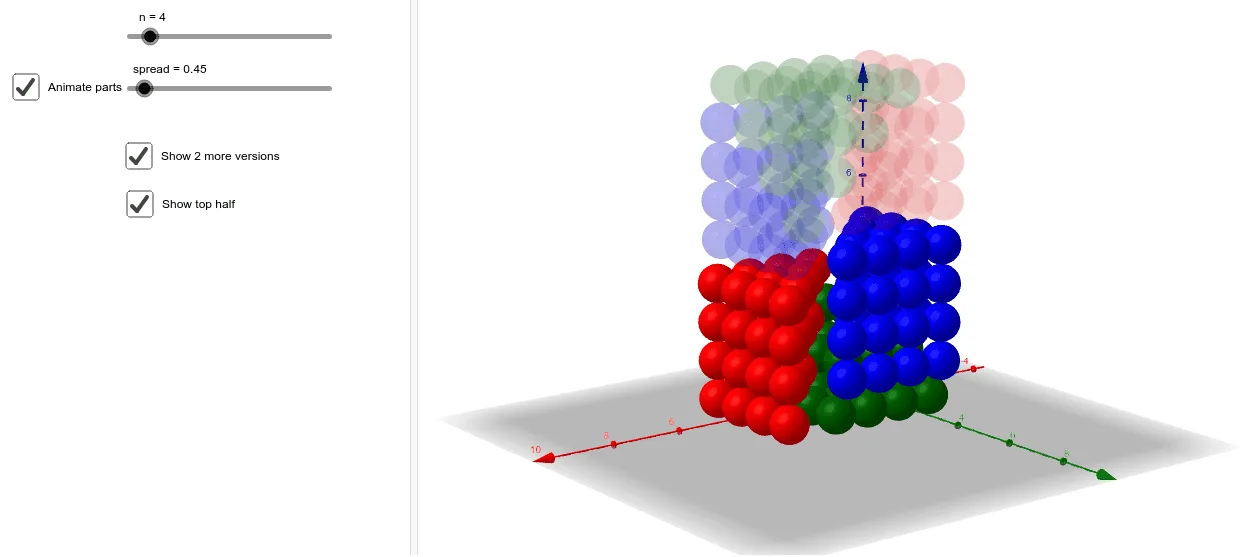
This example demonstrates the concept of the sum of squares in three-dimensional space. It involves core concepts of sequences and coordinate geometry. Using GeoGebra commands such as Join, Zip, Translate, etc., it dynamically shows geometric transformations and loci in 3D space. Suitable for high school mathematics education and learning.
GeoGebra Commands & Parameters
Join(Join[Sequence[Sequence[Sequence[(a, b, c), a, 1, n + 1 - c], b, 1, n + 1 - c], c, 1, n]]) → l1Zip(Sphere[A, 0.5], A, l1) → l2Translate(l2, Vector[(1, 1, 0), A]) → l2'OrthogonalLine(A, xOyPlane) → fRotate(l2', 90°, f) → l2''OrthogonalLine(B, xAxis, xOyPlane) → gRotate(l2'', 90°, g) → l2'''Translate(l2, Vector[(1, 1, 0), C]) → l2'_1OrthogonalLine(C, xOyPlane) → hRotate(l2'_1, (-(90°)), h) → l3OrthogonalLine(D, Plane[(0, 0, 0), (0, 1, 0), (0, 0, 1)]) → iRotate(l3, 90°, i) → l3'Translate(Line[(0, 0, n + 1), (1, 1, n + 1)], Vector[(0.5, 0, 0)]) → jMirror(l3', z = n + 1) → l3''Translate(Rotate[l2''', π, j], Vector[E]) → l4Line(((n + 2) / 2, (n + 1) / 2, 0), zAxis) → kRotate(l3'', π, k) → l5If(spread < 1, spread^(2) + 0.1, spread) → spRotate(Mirror[l2, z = n + 1], π, k) → l7Rotate(Mirror[l2''', z = n + 1], π, k) → l6
AI Drawing Prompt Reference
Create a 3D sum of squares graphic by first generating a series of points, then connecting these points to form line segments. Use rotation and translation commands to generate a series of spheres and line segments. Finally, apply mirroring and rotation operations to produce the final graphic. The process involves creating points, generating spheres, line segments, and performing translations, rotations, and mirroring.
The prompt above was compiled from the original drawing commands and is for reference only.