
Intersection of Two Cones: Constructing the Common Curve in 3D
Loading the math board and drawing, please wait…
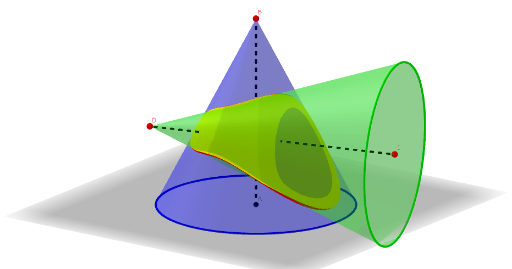
This example demonstrates how two cones intersect in 3D space and how their shared points/curve can be constructed and visualized. The key mathematics is solid geometry: cone (Cone) surfaces, the geometric idea of intersection (Intersect) between two 3D objects, and the use of slicing with an orthogonal plane to make the intersection curve observable. The construction uses GeoGebra commands such as Intersect to compute the intersection, Cone to define the two cone objects (r1, r2), OrthogonalPlane to cut the space and reveal the common locus, and then Join to connect key intersection points. Helper objects like Circle, Segment, and Point support the layout, while Sequence is used to generate ordered sets of points/parameters involved in the construction process (objects such as A, B, and various intermediate points). Suitable for high school to early university lessons on solid geometry and curve visualization, and for exploratory learning with GeoGebra.
GeoGebra Commands & Parameters
Intersect(zAxis, yAxis) → APoint(zAxis) → BCone(A, B, r1) → a, c, bCone(C, D, r2) → d, e, fSegment(C, D) → gCircle(Point[g], r2, g) → hOrthogonalPlane(Point[g], g) → pJoin(Sequence[{Intersect[Circle[Point[g, i], (r2 * (1 - i)), g], IntersectPath[OrthogonalPlane[Point[g, i], g], b]]}, i, 0, 1, 1 / n]) → l2Sequence(Segment[Element[l2, i], Element[l2, i + 1]], i, 1, Length[l2]) → l1Segment(B, A) → i
AI Drawing Prompt Reference
Draw the intersection curve of two cones in 3D space. First, create two cones with axes along the z-axis and y-axis, and radii r1 and r2, respectively. Then, define the first cone with points A and B, and the second cone with points C and D. Next, draw a circle with center at the midpoint of line segment CD. Find the intersection points between this circle and the first cone. Use these intersection points to draw the intersection curve. Finally, connect the points on the curve to form the complete intersection curve.
The prompt above was compiled from the original drawing commands and is for reference only.