
Substitution Fractal 3: Recursively Constructed Polygonal Figure
Loading the math board and drawing, please wait…
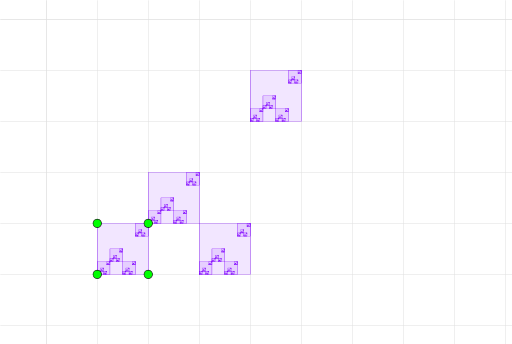
This example demonstrates a substitution (substitution-rule) fractal by iteratively transforming and assembling a polygonal structure to reveal geometric self-similarity. The key mathematical ideas are fractal geometry (substitution fractals), recursive geometric construction, and how incircle/inscribed-circle style constraints influence the placement of vertices and boundary segments across iterations. Construction-wise, it is based on GeoGebra’s Polygon command to build the main boundary from defining points, including A, B, C, D, plus parameter or auxiliary points q1, a, b, c, d and segment/level markers l1, l2, l3, l4 that organize connections for successive stages of the pattern. Suitable for high school to early university audiences, especially for lessons on fractals, recursive geometry, and rules-based model building.
GeoGebra Commands & Parameters
Polygon(A, B, C, D) → q1, a, b, c, d
AI Drawing Prompt Reference
Create a substitution-rule polygonal fractal by building a main polygonal boundary first as a quadrilateral with vertices A, B, C, and D in order. Then define key auxiliary points q1 and additional helper points a, b, c, d derived from these vertices, which determine how boundary segments and vertex placements should be iteratively updated in successive stages. Arrange the connected line segments so the figure reveals geometric self-similarity across iterations. Use incircle/inscribed-circle style constraints to guide the relative placement of vertices and the way neighboring boundary edges connect, producing a clean recursive polygonal pattern.
The prompt above was compiled from the original drawing commands and is for reference only.