
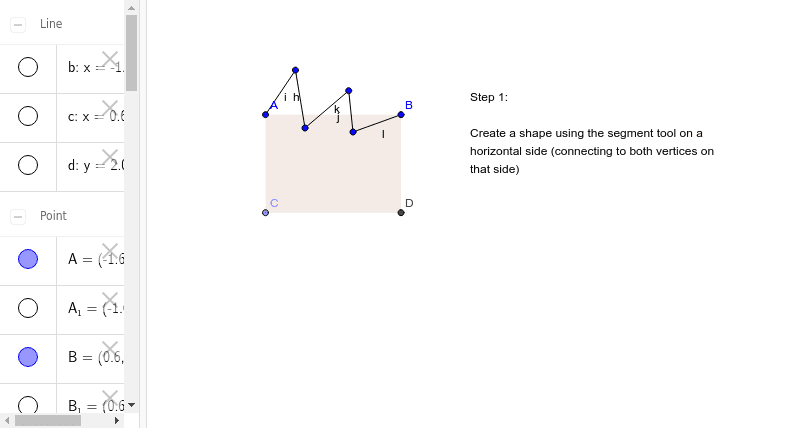
Step 1: Rectangle Translation Tessellation
Loading the math board and drawing, please wait…
In collections
Tess 1
This example demonstrates the first step in constructing a rectangle translation tessellation, focusing on creating the fundamental parallelogram unit. Key math concepts include parallel lines, perpendicular lines, intersection points, and polygon construction. GeoGebra commands used are Segment, OrthogonalLine, Point, Intersect, and Polygon. Suitable for middle school and above students learning geometric transformations and tessellations.
GeoGebra Commands & Parameters
Segment(A, B) → aOrthogonalLine(A, a) → bOrthogonalLine(B, a) → cPoint(b) → COrthogonalLine(C, b) → dIntersect(c, d) → DSegment(A, C) → eSegment(C, D) → fSegment(D, B) → gPolygon(A, B, D, C) → poly1, a_1, b_1, d_1, c_1Segment(A_1, B_1) → a_2Segment(E_1, F_1) → i_1Segment(F_1, G_1) → j_1Segment(G_1, H_1) → k_1Segment(H_1, I_1) → l_1Segment(A, F_1) → hSegment(F_1, G_1) → iSegment(G_1, H_1) → jSegment(H_1, I_1) → kSegment(I_1, B) → l
AI Drawing Prompt Reference
Draw a rectangle, then draw perpendicular lines from one side to create intersection points with the opposite side, forming a parallelogram. Connect the points to construct the parallelogram, and repeat the process to create a fundamental unit for rectangle translation tessellation.
The prompt above was compiled from the original drawing commands and is for reference only.