
Step 3 of Rectangle Translation Tessellation
Loading the math board and drawing, please wait…
In collections
Tess 1
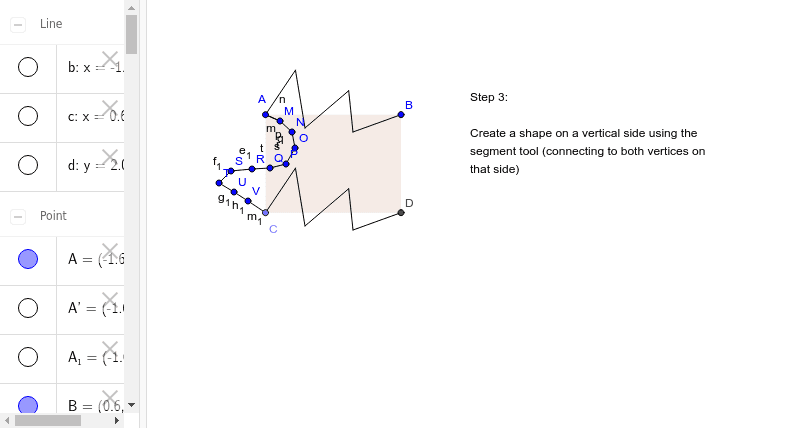
This example demonstrates the third step of rectangle translation tessellation. The core mathematical concepts involved are geometric transformations, specifically translation. Using GeoGebra commands such as Segment, OrthogonalLine, Point, Intersect, Polygon, Vector, Translate, etc., the construction of translated rectangles is illustrated. Suitable for middle school and above students learning geometric transformations.
GeoGebra Commands & Parameters
Segment(A, B) → aOrthogonalLine(A, a) → bOrthogonalLine(B, a) → cPoint(b) → COrthogonalLine(C, b) → dIntersect(c, d) → DSegment(A, C) → eSegment(C, D) → fSegment(D, B) → gPolygon(A, B, D, C) → poly1, a_1, b_1, d_1, c_1Segment(A_1, B_1) → a_2Segment(E_1, F_1) → i_1Segment(F_1, G_1) → j_1Segment(G_1, H_1) → k_1Segment(H_1, I_1) → l_1Segment(A, F_1) → hSegment(F_1, G_1) → iSegment(G_1, H_1) → jSegment(H_1, I_1) → kSegment(I_1, B) → lVector(A, C) → uTranslate(A, u) → A'Translate(F_1, u) → ESegment(A', E) → h'Translate(F_1, u) → FTranslate(G_1, u) → GSegment(F, G) → i'Translate(G_1, u) → HTranslate(H_1, u) → ISegment(H, I) → j'Translate(H_1, u) → JTranslate(I_1, u) → KSegment(J, K) → k'Translate(I_1, u) → LTranslate(B, u) → B'Segment(L, B') → l'Segment(A, M) → mSegment(M, A) → nSegment(M, N) → pSegment(N, O) → qSegment(O, P) → rSegment(P, Q) → sSegment(Q, R) → tSegment(R, S) → e_1Segment(S, T) → f_1Segment(T, U) → g_1Segment(U, V) → h_1Segment(V, C) → m_1
AI Drawing Prompt Reference
Draw a diagram illustrating the third step of rectangle translation tessellation. Start with a base rectangle with horizontal top and bottom edges and vertical left and right sides. Draw a diagonal line from the top-left corner to the bottom-right corner, dividing the rectangle into two triangles. Then, using this diagonal as the translation vector, translate the entire rectangle along that direction to create a second rectangle that partially overlaps the first. Continue translating the second rectangle by the same vector to form a third rectangle, creating a tessellating pattern. Finally, indicate the translation direction with an arrow and keep all construction lines visible to show the geometric transformation process.
The prompt above was compiled from the original drawing commands and is for reference only.