
Highly Super Symmetry in Geometry-2
Loading the math board and drawing, please wait…
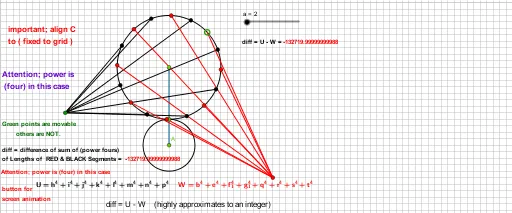
① This example demonstrates a highly symmetric geometric figure constructed using circles, points, segments, rotations, and reflections, generating a series of interconnected points and angles that exhibit striking symmetry. ② Core mathematical concepts include symmetry, rotation, reflection, circumcircle, centroid/barycenter, vectors, and the visualization of power functions, binomial distribution, and other statistical distributions within a geometric context. ③ Construction details: Based on the construction summary, the GeoGebra commands used include Circle, Point, Line, Segment, Rotate, Angle, and Mirror, creating multiple points (A, B, C, D, E, F, G, H) and their rotated/reflected counterparts (D', D'', D''', etc.), along with defined angles (α, β, γ, δ, etc.) to build the highly symmetric pattern. ④ Suitable for high school and above, this example is ideal for exploring geometric symmetry, transformations, and the intersection of geometry with distribution concepts, as well as for mathematical art or computer-assisted geometric design.
GeoGebra Commands & Parameters
Circle(A, a) → cPoint(c) → BLine(A, B) → fPoint(f) → CSegment(A, C) → gCircle(C, g - a) → dPoint(d) → DRotate(D, 22.5°, C) → D'Angle(D, C, D') → αRotate(D', 22.5°, C) → D''Angle(D', C, D'') → βRotate(D'', 22.5°, C) → D'''Angle(D'', C, D''') → γRotate(D''', 22.5°, C) → EAngle(D''', C, E) → δRotate(E, 22.5°, C) → E'Angle(E, C, E') → εRotate(E', 22.5°, C) → E''Angle(E', C, E'') → ζRotate(E'', 22.5°, C) → E'''Angle(E'', C, E''') → ηRotate(E''', 22.5°, C) → FAngle(E''', C, F) → θRotate(F, 22.5°, C) → F'Angle(F, C, F') → ιRotate(F', 22.5°, C) → F''Angle(F', C, F'') → κRotate(F'', 22.5°, C) → F'''Angle(F'', C, F''') → λRotate(F''', 22.5°, C) → GAngle(F''', C, G) → μRotate(G, 22.5°, C) → G'Angle(G, C, G') → νRotate(G', 22.5°, C) → G''Angle(G', C, G'') → ξRotate(G'', 22.5°, C) → G'''Angle(G'', C, G''') → οMirror(H, A) → H'Segment(D', H) → hSegment(G''', H) → iSegment(G', H) → jSegment(F''', H) → kSegment(F', H) → lSegment(E''', H) → mSegment(E', H) → nSegment(D''', H) → pSegment(D, H') → qSegment(G'', H') → rSegment(G, H') → sSegment(F'', H') → tSegment(F, H') → bSegment(E'', H') → eSegment(D'', H') → f_1Segment(E, H') → g_1
AI Drawing Prompt Reference
In the plane, start with a circle defined by center A and radius a. Place a point B on this circle, then draw the line through A and B and choose the point C on that line to form a segment from A to C. Construct a second circle centered at C with radius equal to (distance from C to A minus a), and take its point of intersection as D. Using C as the rotation center, rotate D successively by 22.5° to obtain D′, D″, and D‴, marking the angles at C between each pair as α, β, and γ. Continue the same 22.5° rotation chain to create E, E′, E″, E‴, then F, F′, F″, F‴, and G, G′, G″, G‴, marking the corresponding angles at C as δ, ε, ζ, η, θ, ι, κ, λ, μ, ν, ξ, and ο. Finally, mirror point H across A to get H′ and draw segments connecting H to D′, G‴, G′, F‴, F′, E‴, E′, and D, and connect H′ to q, r, and G″ with the given symmetric segment links.
The prompt above was compiled from the original drawing commands and is for reference only.