
Bike Wheel Geometric Construction and Rotation Animation
Loading the math board and drawing, please wait…
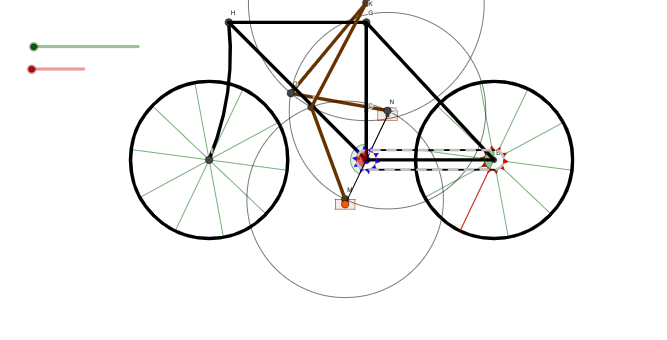
This GeoGebra example demonstrates the geometric construction of a bicycle wheel and its rotational motion. Core mathematical concepts include circle geometry, rotation transformation, angle calculation, and vector translation. Construction points: Create key points using Point command (wheel center, spoke endpoints), define angles with Angle command, draw spokes with Segment command, create wheel rim with Circle command, construct circular arcs with CircleSector and CircumcircleArc commands, build polygon wheel structure with Polygon command, generate spoke sequences with Sequence command, implement wheel rotation animation with Vector and Translate commands, perform mirror reflections with Mirror command, draw complex curves with PolyLine command. Use sliders to control rotation and dynamically demonstrate the mathematical principles of wheel rotation. Suitable for middle school mathematics courses on circle geometry, rotation transformations, and angle concepts, as well as practice of geometric construction skills.
GeoGebra Commands & Parameters
Point(Circle[A, (2.5 * zr)]) → C'Angle(C, A, C') → angSegment(F, E) → lSegment(A, C') → aCircleSector(A, F, Rotate[F, t1, A]) → cCircle(B, wr) → ePolygon(F + v / 5, F + h / 10, F - h / 10) → fth, b, f, gPolygon(E + v / 5, E + h / 10, E - h / 10) → bth, i, j, kSequence(Rotate[fth, t1 + ((i * 2) * π / fthr), A], i, 1, fthr) → list3Sequence(Rotate[bth, t2 + ((i * 2) * π / bthr), B], i, 1, bthr) → list4Segment(Mirror[F, A], Mirror[E, B]) → mVector(E, F) → clvMirror(F, A) → F'CircleSector(B, E, Rotate[E, t2, B]) → dMirror(E, B) → E'Vector(F', E') → clv2PolyLine(A, B, G, A, H, G) → nCircumcircleArc(H, H - (3 * v), I) → pTranslate(e, Vector[B, I]) → e'Sequence(Segment[Rotate[D, t2 + ((i * 2) * π / ws), B], Rotate[E, t2 + ((i * 2) * π / ws), B]], i, 1, ws) → list1Sequence(Segment[I, Rotate[J, t2 + ((i * 2) * π / ws), I]], i, 1, ws) → list2Circle(M, (5 * zr)) → d_1Circle(K, (6 * zr)) → c_1Intersect(c_1, d_1, 2) → LPolygon(C' + (0.5 * h) + (0.25 * v), C' + (0.5 * h) - (0.25 * v), C' - (0.5 * h) - (0.25 * v), C' - (0.5 * h) + (0.25 * v)) → poly2, b_1, e_1, f_1, g_1PolyLine(K, L, M) → a_1Mirror(C', A) → C''Mirror(poly2, A) → poly2'Circle(N, (5 * zr)) → h_1Intersect(c_1, h_1, 2) → OPolyLine(K, O, N) → i_1Segment(A, C'') → j_1Circle(A, r1) → k_1Circle(B, r2) → p_1Sequence(Arc[k_1, Rotate[F, Min[3.141592653589793, Max[0, (((clink * i) + posModl) / cl1 * π)]], A], Rotate[F, Max[0, Min[3.141592653589793, (((clink * i) + posModl + clink / 2) / cl1 * π)]], A]], i, 0, round(cl1 / clink)) → list5Sequence(Arc[p_1, Rotate[E', Min[3.141592653589793, Max[0, (((clink * i) + posModr) / cl2 * π)]], B], Rotate[E', Max[0, Min[3.141592653589793, (((clink * i) + posModr + clink / 2) / cl2 * π)]], B]], i, 0, round(cl2 / clink)) → list7Sequence(Segment[F' + (clv2 * Min[1, Max[0, ((clink * i) + posModb) / l]]), F' + (clv2 * Min[1, Max[0, ((clink * i) + posModb + clink / 2) / l]])], i, 0, If[(clink * nclink) + posModb > l, nclink - 1, nclink]) → list6Sequence(Segment[E + (clv * Min[1, Max[0, ((clink * i) + posModt) / l]]), E + (clv * Min[1, Max[0, ((clink * i) + posModt + clink / 2) / l]])], i, 0, If[(clink * nclink) + posModb > l, nclink - 1, nclink]) → list8Element(list1, Length[list1]) → l_1
AI Drawing Prompt Reference
Draw a geometric bicycle-wheel scene on a plane with two main circular outlines: use two given centers to construct circles of different radii, then find intersection points between the circles to define key arcs and connecting segments. Set up reference angles using the center and an additional constructed point, and build wheel-like sector arcs from a radius direction. Create spoke lines by repeatedly rotating initial segments around each corresponding center in equal angular steps, forming multiple evenly spaced spokes. Mirror the spoke structures across the appropriate axes to obtain a symmetric counterpart. Combine the sector arcs, the rotated/mirrored segments, and additional polylines and circumferential arcs through the constructed intersection points to form the full wheel geometry, intended to illustrate rotational motion via a rotation parameter.
The prompt above was compiled from the original drawing commands and is for reference only.