
Explore Quadrilaterals and Similar Triangles
Loading the math board and drawing, please wait…
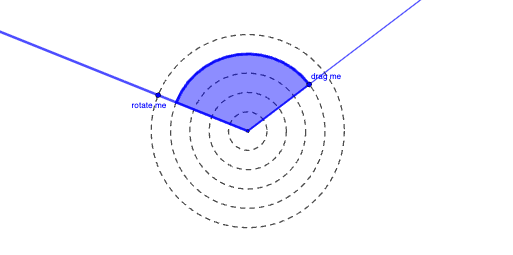
This example demonstrates how to explore geometric relationships under different angles by constructing quadrilaterals and similar triangles. Core math concepts include polygons, properties and criteria of similar triangles, angle calculations, and fraction operations. Construction highlights the use of GeoGebra commands and objects like Circle, Point, Ray, Intersect, CircleSector, and CircleArc for precise drawing and computation. Suitable for high school students to understand geometric constructions and deepen their grasp of the application of similar triangles.
GeoGebra Commands & Parameters
Circle(A, 0.5) → cCircle(A, 1) → dCircle(A, 1.5) → eCircle(A, 2) → fCircle(A, 2.5) → gPoint(g) → BRay(A, B) → hIntersect(c, h, 1) → EIntersect(d, h, 1) → GIntersect(e, h, 1) → IIntersect(f, h, 1) → KPoint(g) → CRay(A, C) → iPoint(i) → DCircleSector(A, D, B) → kPoint(h) → FCircleArc(A, D, F) → p
AI Drawing Prompt Reference
On a plane choose a central point A and draw a ray from A. Construct several concentric circles centered at A with radii 0.5, 1, 1.5, 2, and 2.5. Use the ray to intersect these circles, marking the intersection points on the ray for each radius. With two selected ray endpoints on the circles, construct a sector with center A using those two points as the boundaries, and then draw the corresponding circular arc for the same angle. Arrange everything so the ray and the marked points clearly show the angle and its arc.
The prompt above was compiled from the original drawing commands and is for reference only.