
Standard Parabola with Focus, Directrix, and Tangent Dynamics
Loading the math board and drawing, please wait…
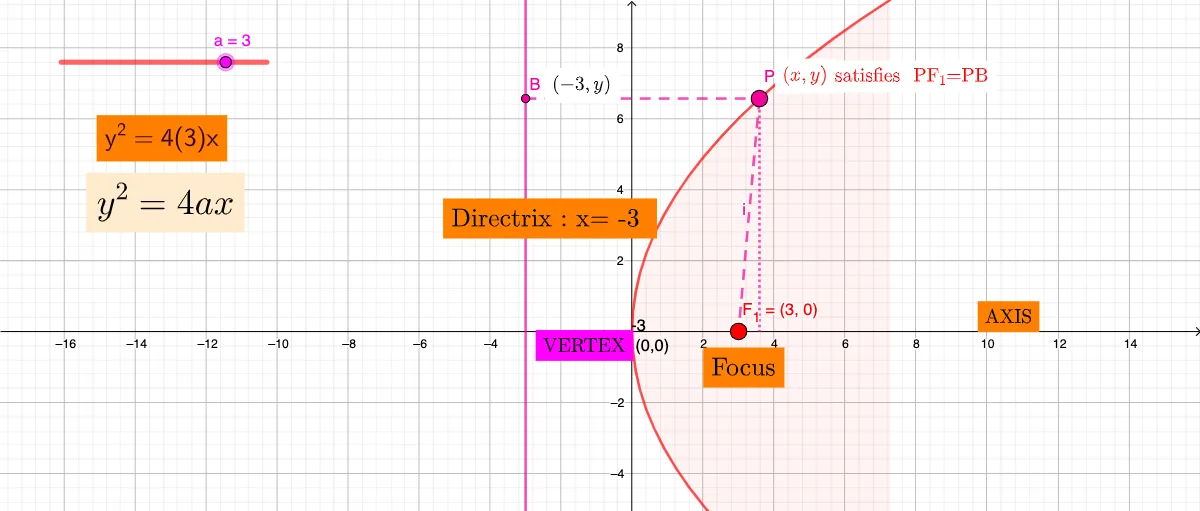
① This GeoGebra example dynamically illustrates the standard parabola y²=4ax, showing its focus, directrix, tangent and normal lines. ② Core mathematical concepts include conic sections (parabola), standard equation, focus-directrix definition, tangent slope via derivative, and geometric constructions of points and lines. ③ Construction uses commands: Point, OrthogonalLine, Intersect, Segment, If; objects include parameter a, focus F₁, equations eq1/eq2, dynamic text via FormulaText, and multiple text labels (text1–text9) to annotate properties. ④ Suitable for high school analytic geometry or introductory calculus, this interactive tool helps students visualize how the parameter a changes the parabola's shape and how tangent lines relate to the derivative, making it ideal for classroom demonstration or self-paced exploration.
GeoGebra Commands & Parameters
Point(eq1) → POrthogonalLine(P, eq2) → fIntersect(eq2, f) → BSegment(B, P) → gSegment(P, F_{1}) → hIf(a > 0, "-" + (abs(a)), Text[abs(a)]) → tSegment(P, Q) → i
AI Drawing Prompt Reference
Draw the standard parabola y² = 4ax with its changing shape controlled by the parameter a. Include the focus F₁ and the directrix-related reference line. Choose a point P on the parabola. Through P, construct a line that is orthogonal to the directrix construction line, then intersect this line with the parabola to obtain the point B. Draw the segment between B and P (g) and the segment between P and the focus F₁ (h), and also draw the segment from P to an additional constructed point Q (i). Add a dynamic text label showing the absolute value of a, displayed as abs(a).
The prompt above was compiled from the original drawing commands and is for reference only.