
Square Root Function Graph Construction and Analysis
Loading the math board and drawing, please wait…
In collections
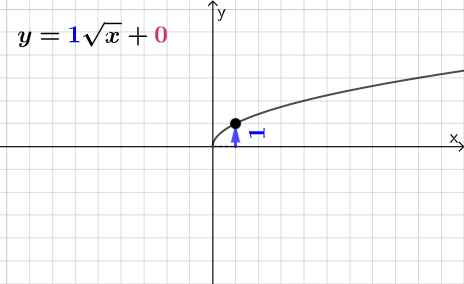
Square Root Function Anatomy: Exploration
This example demonstrates the graphical characteristics of the square root function and its relationship with the coordinate axes. Key mathematical concepts include function definition, radical operations, and image transformations. Construction involves using GeoGebra commands such as Point, Line, and RotateText to build the function graph, with key points labeled. Suitable for high school students learning function graph analysis and geometric construction.
GeoGebra Commands & Parameters
Point(Segment[(h + 1, y(C) + 10), (h + 1, y(C) - 10)]) → DLine(A, B) → fVector(A, C) → uPolygon(A, C, B) → t1, b, a_1, cRotateText(text2, pi / 2) → text3Segment(A, C) → h_{1}Vector(C, D) → vVector((h, 0), A) → wVector((0, 0), (h, 0)) → j
AI Drawing Prompt Reference
Draw the graph of a square root function, showing its relationship with the coordinate axes. Start by placing a key point on the graph, then draw a straight line through this point to represent the function. From the origin, use vectors to indicate horizontal and vertical displacements to this point, and construct a right triangle with vertices at the origin, the key point, and an auxiliary point. Mark a point on one side of the triangle)Skip adding a vector from that point. Finally, place a rotated text label near the graph to annotate the function. The overall figure should include axes, the function curve, an auxiliary triangle, vectors, and text labels, suitable for high school students analyzing function graph characteristics.
The prompt above was compiled from the original drawing commands and is for reference only.