
Square Puzzle
Loading the math board and drawing, please wait…
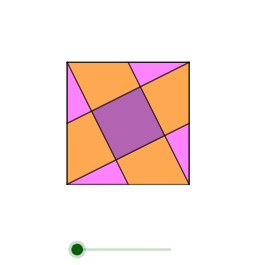
This example demonstrates a square puzzle, involving the geometric properties of a square. Using GeoGebra commands such as Intersect, Point, and Polygon, various parts of the square can be constructed. Suitable for middle school and above students, this example is useful for geometric construction and learning about squares.
GeoGebra Commands & Parameters
Intersect(xAxis, yAxis) → APoint(xAxis) → BPolygon(A, B, 4) → poly1, f, g, h, i, C, DMidpoint(h) → EMidpoint(g) → FMidpoint(f) → GMidpoint(i) → HCentroid(poly1) → ISegment(H, C) → jSegment(E, B) → kSegment(F, A) → lSegment(G, D) → mIntersect(j, m) → JIntersect(j, k) → KIntersect(k, l) → LIntersect(l, m) → MPolygon(H, J, D) → t1, d, h_1, j_1Polygon(K, E, C) → t2, c, k_1, ePolygon(B, F, L) → t3, l_1, b, f_1Polygon(G, M, A) → t4, a, g_1, m_1Polygon(A, M, J, H) → q1, a_1, m_2, j_2, h_2Polygon(J, D, E, K) → q2, j_3, d_1, e_1, k_2Polygon(L, K, C, F) → q3, l_2, k_3, c_1, f_2Polygon(L, M, G, B) → q4, l_3, m_3, g_2, b_1Polygon(L, M, J, K) → q5, l_4, m_4, j_4, k_4Rotate(B, aa, F) → B'Rotate(F, aa, F) → F'Rotate(L, aa, F) → L'Polygon(B', F', L') → t3', l', b', f'Rotate(K, aa, E) → K'Rotate(E, aa, E) → E'Rotate(C, aa, E) → C'Polygon(K', E', C') → t2', c', k', e'Rotate(H, aa, H) → H'Rotate(J, aa, H) → J'Rotate(D, aa, H) → D'Polygon(H', J', D') → t1', d', h', j'Rotate(G, aa, G) → G'Rotate(M, aa, G) → M'Rotate(A, aa, G) → A'Polygon(G', M', A') → t4', a', g', m'
AI Drawing Prompt Reference
Draw a square and demonstrate its internal geometric division. Start by constructing a square, then find the midpoints of opposite sides and connect them to form a new quadrilateral. Further divide these quadrilaterals into smaller polygons, creating a complex geometric pattern. Ensure the symmetry and geometric accuracy of the design.
The prompt above was compiled from the original drawing commands and is for reference only.