
Square Cross Section: Step 5
Loading the math board and drawing, please wait…
In collections
Square Cross Sections
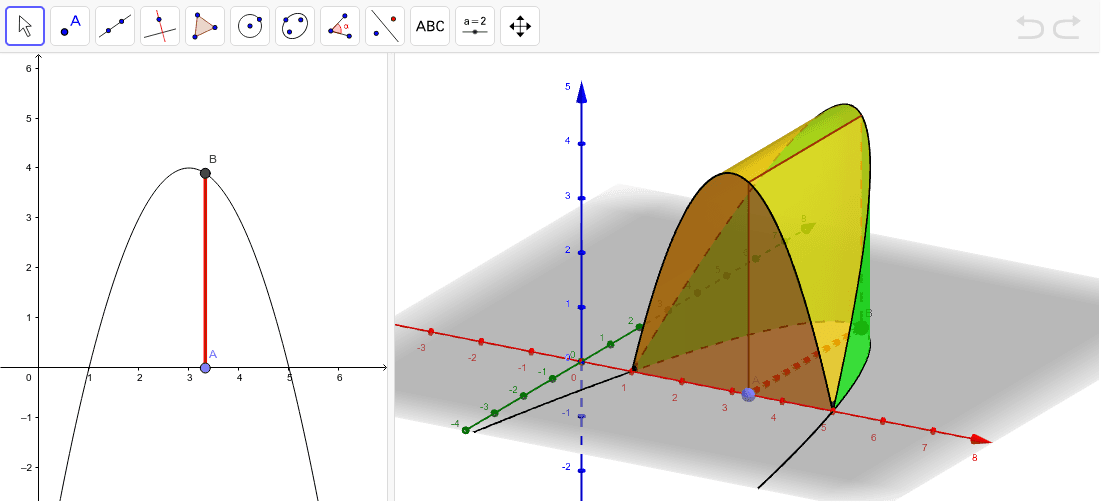
This example demonstrates constructing a square cross-section using parametric equations in three-dimensional geometry. Key mathematical concepts include parametric curves, surface plotting, and geometric transformations. Construction involves GeoGebra commands such as Surface, CurveCartesian, and Point to create the 3D model. Suitable for high school students or college freshmen learning coordinate geometry and surface construction.
GeoGebra Commands & Parameters
Root(f) → R1, R2Segment(R1, R2) → aPoint(a) → ASegment(A, B) → bPolygon(A, B, (x(B), y(B), y(B)), (x(A), y(A), y(B))) → poly1, a_1, b_1, c, dCurveCartesian(t, 0, f(t), t, 1, 5) → eCurveCartesian(t, f(t), f(t), t, 1, 5) → gSurface(u + ((1 - u) * t), (u * 0) + ((1 - u) * 0), (u * 0) + ((1 - u) * f(t)), u, 0, 1, t, 1, 5) → hSurface((u * t) + ((1 - u) * t), (u * 0) + ((1 - u) * f(t)), (u * f(t)) + ((1 - u) * f(t)), u, 0, 1, t, 1, 5) → iSurface((u * t) + ((1 - u) * t), (u * f(t)) + ((1 - u) * f(t)), (u * 0) + ((1 - u) * f(t)), u, 0, 1, t, 1, 5) → j
AI Drawing Prompt Reference
Draw a 3D coordinate system with a square cross-section model. Start by plotting a curve in the coordinate plane and marking its two intersection points with the axis, then connect them with a line segment. Place a moving point on this segment and connect it to another fixed point to form a side. Use this side as the base to construct a square, with its four vertices at the endpoints of the side and their projected positions in space. Then, draw two spatial curves: one extending horizontally and the other vertically. Finally, fill the regions enclosed by these curves and the square boundaries with three surface patches to create a solid cross-section effect.
The prompt above was compiled from the original drawing commands and is for reference only.