
Square Cross Section: Step 4
Loading the math board and drawing, please wait…
In collections
Square Cross Sections
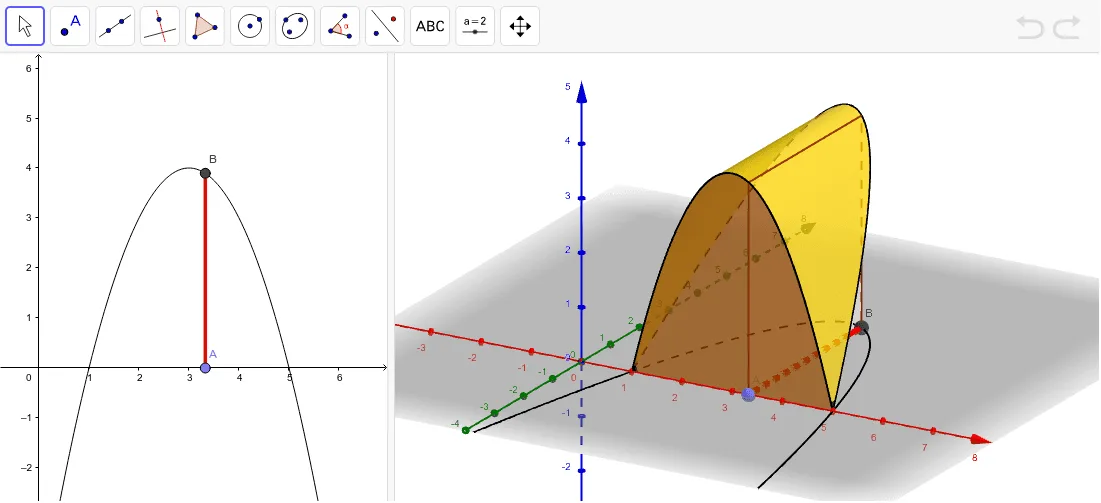
This example demonstrates how to construct the top of a square cross section using GeoGebra. Key mathematical concepts include functions and parametric equations. The Surface command is used to create the surface, Polygon to draw polygons, and CurveCartesian to plot curves. Suitable for high school mathematics education and learning.
GeoGebra Commands & Parameters
Root(f) → R1, R2Segment(R1, R2) → aPoint(a) → ASegment(A, B) → bPolygon(A, B, (x(B), y(B), y(B)), (x(A), y(A), y(B))) → poly1, a_1, b_1, c, dCurveCartesian(t, 0, f(t), t, 1, 5) → eCurveCartesian(t, f(t), f(t), t, 1, 5) → gSurface(u + ((1 - u) * t), (u * 0) + ((1 - u) * 0), (u * 0) + ((1 - u) * f(t)), u, 0, 1, t, 1, 5) → hSurface((u * t) + ((1 - u) * t), (u * 0) + ((1 - u) * f(t)), (u * f(t)) + ((1 - u) * f(t)), u, 0, 1, t, 1, 5) → i
AI Drawing Prompt Reference
Draw a 3D square cross-section top structure. Start by plotting a function curve and marking its two x-axis intersections. Connect these intersections with a line segment, and place a point on this segment. Using this point and another given point, construct a square with vertices directly above and below them, forming vertical sides. Then, add two space curves: one along the x-axis and one diagonal. Finally, create two surfaces to cover the bottom and top regions, resulting in a solid cross-section bounded by curves.
The prompt above was compiled from the original drawing commands and is for reference only.