
Spiral Screw Bisection of a Sphere v2
Loading the math board and drawing, please wait…
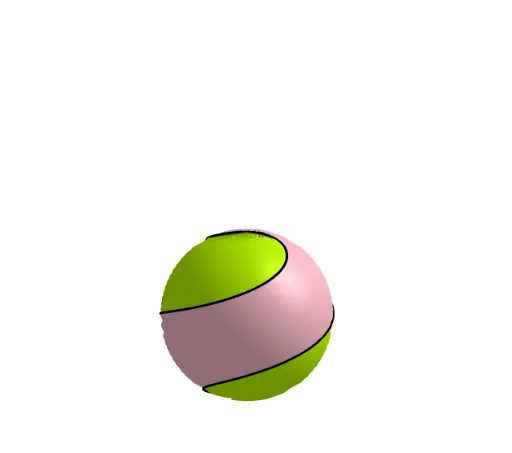
This example demonstrates how a spiral screw bisects a sphere. Key mathematical concepts include spherical geometry, linear functions, and geometric transformations. Using GeoGebra commands such as Surface, CurveCartesian, Rotate, and Translate, the construction of the spiral screw and its effect on the sphere's bisection can be observed. Suitable for high school mathematics education and research.
GeoGebra Commands & Parameters
Surface((cos(t) * cos(u)), (cos(t) * sin(u)), sin(t), t, 0, (2 * π), u, 0, π) → aCurveCartesian((r(t) * cos((π * t))), (r(t) * sin((π * t))), t, t, -1, 1) → cRotate(c, π, zAxis) → dSurface((u * x(c(t))) + ((1 - u) * x(d(t))), (u * y(c(t))) + ((1 - u) * y(d(t))), (u * z(c(t))) + ((1 - u) * z(d(t))), t, -1, 1, u, 0, 1) → bSurface(c, π, zAxis) → eTranslate(Rotate[b, (π * n)], Vector[(0, 0, n)]) → fTranslate(Rotate[c, (π * n)], Vector[(0, 0, n)]) → gTranslate(Rotate[d, (π * n)], Vector[(0, 0, n)]) → hTranslate(Rotate[Surface[d, π, zAxis], (π * n)], Vector[(0, 0, n)]) → i
AI Drawing Prompt Reference
Visualize how a spiral bisects a sphere, demonstrating the intersection of spherical geometry and linear functions. Start by creating a spherical surface, then draw a helical curve passing through the sphere's center. Rotate this helix by π around the Z-axis to form a mirrored helix. Interpolate between the two helices to generate a smooth transitional surface, creating a spiral bisection. Periodically translate and rotate the entire structure along the Z-axis to illustrate its spatial expansion.
The prompt above was compiled from the original drawing commands and is for reference only.