
Sphericon Construction
Loading the math board and drawing, please wait…
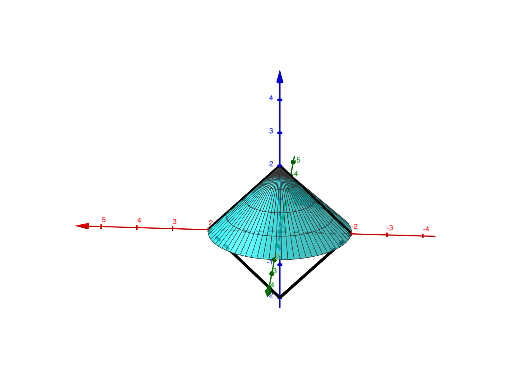
This example demonstrates the construction and properties of a Sphericon, a unique 3D shape formed by rotating a triangle around an axis. It involves core math concepts like solid geometry, surface area, rotation bodies, and special points. The construction uses commands like Point, Segment, Surface, and Rotate, emphasizing spatial visualization and geometric transformations. Ideal for high school students and math enthusiasts exploring complex 3D shapes and constructions.
GeoGebra Commands & Parameters
Point(zAxis) → APoint(xAxis) → BPoint(xAxis) → CPoint(zAxis) → DSegment(A, B) → fSegment(D, B) → gSegment(A, C) → hSegment(C, D) → iSurface(h, α, zAxis) → upper1Rotate(upper1, β, yAxis) → upper1'Surface(f, 180°, zAxis) → sidef1Surface(g, 180°, zAxis) → sidef2Surface(h, 180°, zAxis) → sider1Surface(i, 180°, zAxis) → sider2Rotate(sider1, (-γ), yAxis) → sider1'Rotate(sider2, (-γ), yAxis) → sider2'
AI Drawing Prompt Reference
Construct a 3D sphericon by revolving a triangle around an axis. First place reference points on the coordinate axes and connect them with three line segments to form a triangular boundary. Use that triangle to create an upper surface, then rotate the upper surface around a horizontal axis by a second angle to extend it. Next, generate side surface patches using each relevant line segment as the boundary and revolve them around the same main axis by 180 degrees as indicated. Finally, rotate the two corresponding side patches around another horizontal axis by an offset angle so the surface pieces match along their shared edges, forming the complete sphericon shape to visualize its geometric properties.
The prompt above was compiled from the original drawing commands and is for reference only.