
Spherical Trochoid: Dynamic Construction and Visualization
Loading the math board and drawing, please wait…
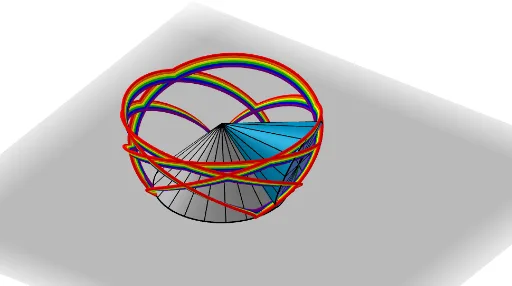
This GeoGebra example demonstrates the trajectory of a point on a sphere as it rolls along a circle, generating a spherical trochoid curve in 3D. The core mathematical concepts include parametric curves, spherical geometry, generalization of cycloids (trochoids), and locus generation in three-dimensional space. Construction highlights: uses the CurveCartesian command to define the parametric curve, along with Sphere, Circle, Cone, Segment, Angle, Surface objects to build the sphere and auxiliary geometric elements; Sequence generates point sets, sliders (e.g., speed, t) control dynamic parameters, and buttons (Bouton1, Bouton2, Bouton3) switch views or animations. The object list includes a, b, d, w, e, h, R, c, tt, E_t, O, f, C, g, k, i, j, p, l, m, α, r, hs, q, n, texte1, liste1, o, E_0, liste3, liste2, which are used to construct complete geometric relations and text displays. Suitable for high school to university-level mathematics learning, especially for analytic geometry, parametric equations, and 3D curve visualization, as well as for mathematical modeling or introductory computer graphics.
GeoGebra Commands & Parameters
CurveCartesian(((a - (b * cos(w)) + (((b + d) * cos(w)) * cos((a / b * t)))) * cos(t)) + (((b + d) * sin(t)) * sin((a / b * t))), ((a - (b * cos(w)) + (((b + d) * cos(w)) * cos((a / b * t)))) * sin(t)) - (((b + d) * cos(t)) * sin((a / b * t))), (sin(w) * (b - ((b + d) * cos((a / b * t))))), t, 0, ((2 * π) * b)) → eSphere((0, 0, h), R) → cCircle((0, 0, 0), a, zAxis) → fCone(C, O, b) → g, k, iCone((0, 0, 0), O, a) → j, p, lSegment(O, E_t) → mAngle(O + (0, 0, -1), O, (a, 0, 0)) → αSegment(O, (a, 0, 0)) → rSurface(((r * cos(u)) * cos(v)), ((r * sin(u)) * cos(v)), h + (r * sin(v)), u, 0, 6.28319, v, -1.5708, ((-π)) / 2 + α) → hsSegment(C, E_t) → qSequence(Rotate[r, i, zAxis], i, 0, 6.28319, ((2 * π / n) * b / a)) → liste1CurveCartesian(((a - (b * cos(w)) + (((b + d) * cos(w)) * cos((a / b * t)))) * cos(t)) + (((b + d) * sin(t)) * sin((a / b * t))), ((a - (b * cos(w)) + (((b + d) * cos(w)) * cos((a / b * t)))) * sin(t)) - (((b + d) * cos(t)) * sin((a / b * t))), (sin(w) * (b - ((b + d) * cos((a / b * t))))), t, 0, tt) → oSequence(Segment[Rotate[C, i, Line[C, O]], Rotate[E_0, i, Line[C, O]]], i, 0, 6.28319, (2 * π / n)) → liste3Sequence(Segment[Rotate[O, i, Line[O, C]], Rotate[E_0, i, Line[O, C]]], i, 0, 6.28319, (2 * π / n)) → liste2Circle(C, b, Line[C, O]) → cmCurveCartesian(((a - (b * cos(w)) + (((b - 0.25) * cos(w)) * cos((a / b * t)))) * cos(t)) + (((b - 0.25) * sin(t)) * sin((a / b * t))), ((a - (b * cos(w)) + (((b - 0.25) * cos(w)) * cos((a / b * t)))) * sin(t)) - (((b - 0.25) * cos(t)) * sin((a / b * t))), (sin(w) * (b - ((b - 0.25) * cos((a / b * t))))), t, 0, tt) → tCurveCartesian(((a - (b * cos(w)) + (((b - 0.5) * cos(w)) * cos((a / b * t)))) * cos(t)) + (((b - 0.5) * sin(t)) * sin((a / b * t))), ((a - (b * cos(w)) + (((b - 0.5) * cos(w)) * cos((a / b * t)))) * sin(t)) - (((b - 0.5) * cos(t)) * sin((a / b * t))), (sin(w) * (b - ((b - 0.5) * cos((a / b * t))))), t, 0, tt) → uCurveCartesian(((a - (b * cos(w)) + (((b - 0.75) * cos(w)) * cos((a / b * t)))) * cos(t)) + (((b - 0.75) * sin(t)) * sin((a / b * t))), ((a - (b * cos(w)) + (((b - 0.75) * cos(w)) * cos((a / b * t)))) * sin(t)) - (((b - 0.75) * cos(t)) * sin((a / b * t))), (sin(w) * (b - ((b - 0.75) * cos((a / b * t))))), t, 0, tt) → vCurveCartesian(((a - (b * cos(w)) + (((b - 1) * cos(w)) * cos((a / b * t)))) * cos(t)) + (((b - 1) * sin(t)) * sin((a / b * t))), ((a - (b * cos(w)) + (((b - 1) * cos(w)) * cos((a / b * t)))) * sin(t)) - (((b - 1) * cos(t)) * sin((a / b * t))), (sin(w) * (b - ((b - 1) * cos((a / b * t))))), t, 0, tt) → a_1CurveCartesian(((a - (b * cos(w)) + (((b - 1.25) * cos(w)) * cos((a / b * t)))) * cos(t)) + (((b - 1.25) * sin(t)) * sin((a / b * t))), ((a - (b * cos(w)) + (((b - 1.25) * cos(w)) * cos((a / b * t)))) * sin(t)) - (((b - 1.25) * cos(t)) * sin((a / b * t))), (sin(w) * (b - ((b - 1.25) * cos((a / b * t))))), t, 0, tt) → b_1
AI Drawing Prompt Reference
Create a 3D scene with a sphere, and a dynamic spiral curve on its surface. Inside the sphere, draw a circle as the rolling path, a cone from the sphere's center to its surface, and another cone from the origin to the center. Add a segment from the center to a moving point on the sphere, and another from the center to a point on the circle. Show several parametric curves for different radii, with an angle marker. Include sliders for speed and parameters, and buttons to switch views or animate.
The prompt above was compiled from the original drawing commands and is for reference only.