
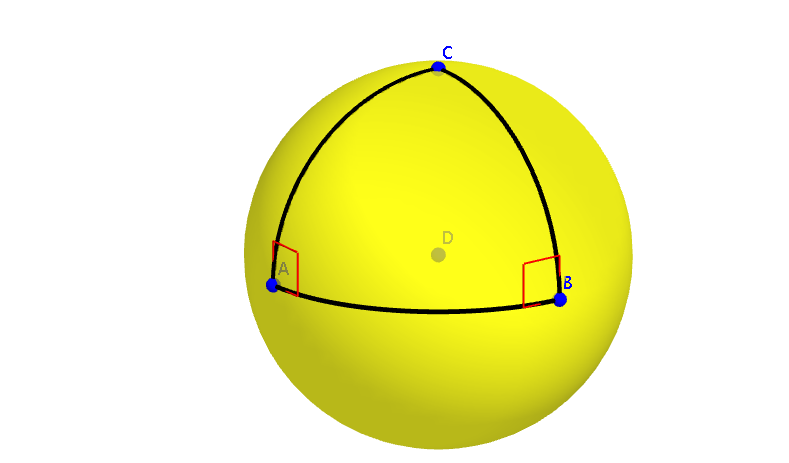
Spherical Triangle: A Birectanglular Triangle
Loading the math board and drawing, please wait…
In collections
Spherical Geometry Ideas
This example illustrates a BIRECTANGULAR SPHERICAL TRIANGLE, a triangle with two right angles. Using GeoGebra commands such as Circle, Sphere, Intersect, Point, CurveCartesian, Angle, Plane, Mirror, IntersectPath, and OrthogonalPlane, this special spherical triangle is constructed. Suitable for high school and above students studying spherical geometry.
GeoGebra Commands & Parameters
Circle((1, 0, 0), (0, 1, 0), (0, -1, 0)) → cSphere((0, 0, 0), 1) → aIntersect(yAxis, a, 1) → APoint(c) → BIntersect(zAxis, a, 2) → CCurveCartesian(0, cos(t), sin(t), t, 90*°, 180*°) → bCurveCartesian((x(B) * cos(t)) + (x(C) * sin(t)), (y(B) * cos(t)) + (y(C) * sin(t)), (z(B) * cos(t)) + (z(C) * sin(t)), t, 0, 90*°) → dAngle(A, D, B) → αCurveCartesian(cos(t - 90°), sin(t - 90°), 0, t, 0*°, α) → ePlane(A, D, C) → fMirror(e, f) → e'Plane(A, D, B) → gIntersectPath(f, g) → hOrthogonalPlane(A, h) → iIntersectPath(i, g) → jIntersectPath(f, i) → kAngle(k, j) → βPoint(j) → EPoint(k) → FAngle(E, A, F) → γPlane(C, D, B) → lIntersectPath(g, l) → mOrthogonalPlane(B, m) → nIntersectPath(n, g) → pIntersectPath(n, l) → qPoint(p) → GPoint(q) → HAngle(H, B, G) → δ
AI Drawing Prompt Reference
Draw a spherical triangle with two right angles. Start by creating a unit sphere and determining points A, B, and C on its three axes. Then, draw two curves b and d that intersect the sphere to form two arcs. Use reflections and planes to construct the triangle's three vertices E, F, and G, and the three angles α, β, and δ. Ensure each angle is a right angle to form a Birectanglular spherical triangle.
The prompt above was compiled from the original drawing commands and is for reference only.