
Sphere Inscribed in a Cube: Geometric Construction
Loading the math board and drawing, please wait…
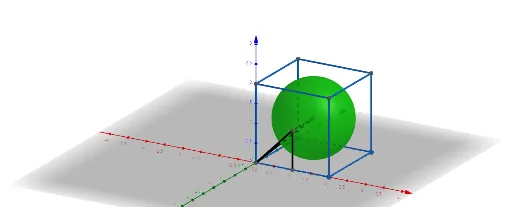
This GeoGebra example demonstrates the construction of a sphere inscribed inside a cube, showing the spatial relationship between the sphere and the cube's faces, edges, and vertices. The core mathematical concepts involve solid geometry, including cubes, spheres, tangency, midpoints, and intersections. The construction uses the Cube command to create the cube, the Midpoint command to locate the center (typically the cube's centroid), and the Sphere command to generate the inscribed sphere with radius equal to the distance from the center to any face. The Intersect command is used to find points where the sphere meets edges or faces, and the Segment command connects relevant points to form auxiliary lines. This example is suitable for high school or early college students learning about inscribed solids in 3D, and serves as a visual aid for understanding symmetry, tangency, and cross-sections in solid geometry.
GeoGebra Commands & Parameters
Intersect(zAxis, xAxis) → APoint(xAxis) → BPoint(Circle[B, Distance[A, B], Segment[A, B]]) → CCube(A, B, C) → a, D, faceCDHG, faceEFGH, edgeAD, edgeAB, edgeBC, edgeCD, edgeAE, edgeDH, edgeEH, edgeEF, E, edgeBF, edgeFG, edgeCG, edgeGH, F, G, H, faceABCD, faceADHE, faceABFE, faceBCGFMidpoint(B, H) → IMidpoint(E, B) → JSphere(I, J) → bSegment(I, A) → fSegment(J, A) → gSegment(I, J) → hMidpoint(A, B) → KSegment(J, K) → i
AI Drawing Prompt Reference
Draw a cube with a sphere inscribed inside it, tangent to all six faces. Start by defining one vertex and two adjacent edges of the cube, then construct the full cube. Locate the center of the cube, and connect the center to a vertex and to the midpoint of an edge to determine the sphere's radius. Draw the sphere, and add auxiliary segments from the center to vertices or edge midpoints to illustrate the spatial relationships.
The prompt above was compiled from the original drawing commands and is for reference only.