
Obtuse Triangle Fractal Construction
Loading the math board and drawing, please wait…
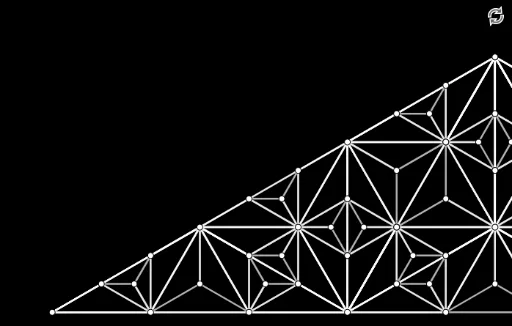
① This example demonstrates how to generate a self-similar fractal pattern by repeatedly rotating and scaling the sides of an obtuse triangle. ② Core mathematical concepts include fractal geometry, similarity transformations (rotation and scaling), limits, rational number ratios, and relationships between interior and exterior angles of triangles. ③ Construction highlights: Based on the construction summary, GeoGebra commands such as Intersect, Point, Rotate, Angle, Line, Polygon are used, along with multiple auxiliary objects like points A, B, C, angle markers α, β, γ, lines f, g, h, and triangles t1 through t4, creating nested triangle sequences through iterative rotation. ④ Suitable for high school or university students studying fractal geometry, geometric transformations, and limits, also useful for math labs or inquiry-based learning to visualize infinite iteration and self-similarity.
GeoGebra Commands & Parameters
Intersect(xAxis, yAxis) → APoint(xAxis) → BRotate(B, 30°, A) → B'Angle(B, A, B') → αRotate(A, (-(30°)), B) → A'Angle(A', B, A) → βLine(A, B') → fLine(B, A') → gIntersect(f, g) → CPolygon(A, B, C) → t1, c, a, bRotate(B, (-(30°)), C) → B'_1Angle(B'_1, C, B) → γLine(C, B'_1) → hRotate(A, 30°, C) → A'_1Angle(A, C, A'_1) → δLine(C, A'_1) → iIntersect(c, xAxis) → DIntersect(i, c) → EIntersect(h, t1) → F, GRotate(G, (-(30°)), C) → G'Angle(G', C, G) → εLine(C, G') → jRotate(C, (-(30°)), E) → C'Angle(C', E, C) → ζLine(E, C') → kIntersect(k, j) → HPolygon(C, E, H) → t2, h_1, c_1, ePolygon(C, H, G) → t3, g_1, c_2, h_2Polygon(B, C, G) → t4, g_2, b_1, c_3Polygon(C, A, E) → t5, e_1, c_4, a_1fraccc(B, C, G) → t6, I, J, t7, t8, t9, Kfraccc(C, A, E) → t10, L, M, t11, t12, t13, Nfraccc(C, E, H) → t14, O, P, t15, t16, t17, Qfraccc(G, C, H) → t18, R, S, t19, t20, t21, Tfraccc(G, B, K) → t22, U, V, t23, t24, t25, Wfraccc(C, G, J) → t26, Z, A_1, t27, t28, t29, B_1fraccc(A, E, M) → t30, C_1, D_1, t31, t32, t33, E_1fraccc(E, M, D_1) → t34, F_1, G_1, t35, t36, t37, H_1fraccc(A, M, E_1) → t38, I_1, J_1, t39, t40, t41, K_1fraccc(M, A, E_1) → t42, L_1, M_1, t43, t44, t45, N_1fraccc(E, C, N) → t46, O_1, P_1, t47, t48, t49, Q_1fraccc(E, G, H) → t50, R_1, S_1, t51, t52, t53, T_1fraccc(G, H, S_1) → t54, U_1, V_1, t55, t56, t57, W_1fraccc(H, E, T_1) → t58, Z_1, A_2, t59, t60, t61, B_2fraccc(E, N, L) → t62, C_2, D_2, t63, t64, t65, E_2fraccc(M, E, L) → t66, F_2, G_2, t67, t68, t69, H_2fraccc(N, M, L) → t70, I_2, J_2, t71, t72, t73, K_2fraccc(C, N, Q) → t74, L_2, M_2, t75, t76, t77, N_2fraccc(K, J, I) → t78, O_2, P_2, t79, t80, t81, Q_2fraccc(K, G, W) → t82, R_2, S_2, t83, t84, t85, T_2fraccc(G, K, I) → t86, U_2, V_2, t87, t88, t89, W_2fraccc(J, G, I) → t90, Z_2, A_3, t91, t92, t93, B_3fraccc(G, J, T) → t94, C_3, D_3, t95, t96, t97, E_3fraccc(C, H, S) → t98, F_3, G_3, t99, t100, t101, H_3fraccc(J, C, S) → t102, I_3, J_3, t103, t104, t105, K_3fraccc(B, K, V) → t106, L_3, M_3, t107, t108, t109, N_3fraccc(H, G, T) → t110, O_3, P_3, t111, t112, t113, Q_3fraccc(E, H, P) → t114, R_3, S_3, t115, t116, t117, T_3fraccc(N, E, P) → t118, U_3, V_3, t119, t120, t121, W_3fraccc(H, C, Q) → t122, Z_3, A_4, t123, t124, t125, B_4
AI Drawing Prompt Reference
Draw an obtuse triangle and generate a self-similar fractal pattern by repeatedly rotating and scaling its sides. Start by plotting a point at the intersection of two axes and draw a horizontal line from it. Rotate one endpoint of the line segment around the intersection point by 30 degrees to create a new point, then connect these two points to form an obtuse triangle. Repeat this process for each side of the triangle, rotating the new line segments by -30 or 30 degrees around their endpoints and connecting the corresponding points to build nested triangles, gradually creating a complex fractal structure.
The prompt above was compiled from the original drawing commands and is for reference only.