
Special Spheroid Locus Demonstration
Loading the math board and drawing, please wait…
In collections
GeoGebra 3D & AR: PreCalc & Calculus Resources
Multivariable Calculus
Quadratic Surfaces
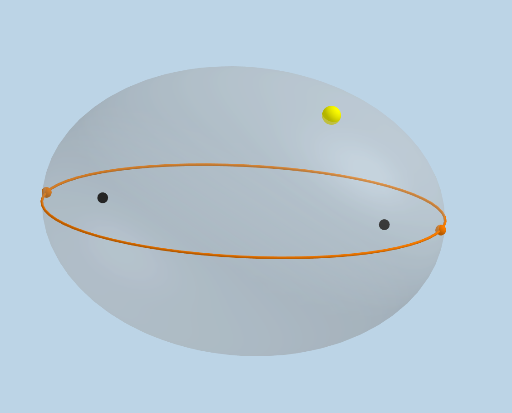
This example demonstrates the locus of a special spheroid. Key mathematical concepts include the rotation of spheroids, locus, and solid geometry. Using GeoGebra commands such as PointIn, IntersectPath, and Rotate, the formation of the locus is dynamically illustrated. Suitable for high school mathematics education and learning.
GeoGebra Commands & Parameters
PointIn(d) → AIntersectPath(z = 0, d) → eMax({MajorAxis, MinorAxis, c}) → maxFocus(e) → B, CVertex(e) → D, E, F, GDilate(B, If[0 < Animate ≤ 1, 1 - Animate, 0], A) → B'Segment(B, B') → iDilate(C, If[0 < Animate ≤ 1, 1 - Animate, 0], A) → C'Segment(C, C') → jVertex(f) → H, I, J, KVertex(g) → L, M, N, ODilate(B, If[1.5 < Animate ≤ 2.5, 2.5 - Animate, 0], D) → B'_1Vector(B, B'_1) → uTranslate(B, u) → B'_2Translate(B', u) → B''Segment(B'_2, B'') → i'OrthogonalLine(B'', k) → lPoint(e) → RSphere(D, B'') → mIntersectPath(z = 0, m) → pIntersect(p, e) → P, Q, ,Angle(P, D, B'') → αRotate(B'_2, If[2.5 < Animate ≤ 3.5, ((-(Animate - 2.5)) * α), (-α)], D) → SPlane(B'', D, P) → nRotate(B'_2, If[2.5 < Animate ≤ 3.5, ((-(Animate - 2.5)) * α), (-α)], D, n) → TRotate(B'', If[2.5 < Animate ≤ 3.5, ((-(Animate - 2.5)) * α), (-α)], D, n) → B'''Segment(T, B''') → i''Angle(B''', D, B) → βRotate(T, If[3.5 < Animate ≤ 4.5, ((Animate - 3.5) * β), β], D) → T'Rotate(B''', If[3.5 < Animate ≤ 4.5, ((Animate - 3.5) * β), β], D) → USegment(T', U) → i'''Dilate(C, If[4.5 < Animate ≤ 5.5, 5.5 - Animate, 0], E) → C'_1Vector(C, C'_1) → vTranslate(C, v) → C'_2Translate(C', v) → C''Segment(C'_2, C'') → j'Sphere(E, C'') → oIntersectPath(z = 0, o) → qIntersect(q, e) → V, W, ,Angle(W, E, C'') → γPlane(E, C'', W) → rRotate(C'_2, If[5.5 < Animate ≤ 6.5, ((Animate - 5.5) * γ), γ], E, r) → ZRotate(C'', If[5.5 < Animate ≤ 6.5, ((Animate - 5.5) * γ), γ], E, r) → C'''Segment(Z, C''') → j''Angle(W, E, D) → δRotate(Z, If[6.5 < Animate ≤ 7.5, ((Animate - 6.5) * δ), δ], E) → Z'Rotate(C''', If[6.5 < Animate ≤ 7.5, ((Animate - 6.5) * δ), δ], E) → A_1Segment(Z', A_1) → j'''Distance(B, A) → sCircle(D, s, xOyPlane) → tSegment(D, E) → f_1Intersect(f_1, xAxis) → B_1Intersect(f_1, t) → C_1, E_1Segment(D, C_1) → g_1Segment(C_1, E) → h_1Dilate(D, If[0 < Animate ≤ 1, 1 - Animate, 0], C_1) → D'Segment(D, D') → i_1Dilate(C_1, If[1 < Animate ≤ 2, 2 - Animate, 0], E) → D_1Segment(C_1, D_1) → j_1Rotate(B''', If[3.5 < Animate ≤ 4.5, ((-(Animate - 3.5)) * β), (-β)], D) → F_1Segment(D, F_1) → k_1
AI Drawing Prompt Reference
Draw a special spheroid locus by first creating a point A on a plane, then creating points B and C on the spheroid. Use rotation and scaling to dynamically generate trajectory points P and Q, and create trajectory lines i and j. Finally, use rotation and translation to generate trajectory lines i', i'', and i''', as well as j', j'', and j''', forming a dynamic spheroid locus.
The prompt above was compiled from the original drawing commands and is for reference only.