
Solving Two-Step Linear Equations Interactive Demo
Loading the math board and drawing, please wait…
In collections
Algebra 1
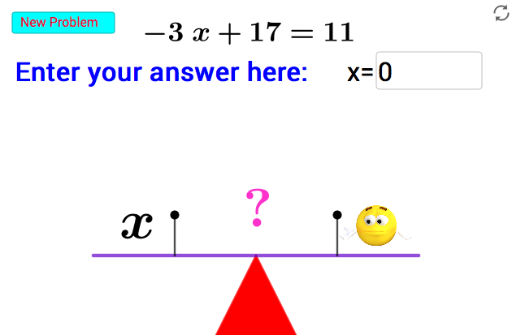
① This GeoGebra example demonstrates how to solve two-step linear equations through an interactive interface, allowing users to input coefficients and constants and observe the equation transformation and solution generation dynamically. ② Core mathematical concepts include solving linear equations in one variable, properties of equality, transposition, combining like terms, and verifying the uniqueness of the solution. ③ Construction highlights: uses Sequence to generate equation term sequences, Textfield and InputBox1 for user input, Polygon, Segment, Point, Rotate commands to build graphical representations, button1 triggers the solving computation, objects like a, b, c, m, n store coefficients and intermediate results, text1 to text5 display step-by-step explanations, and the dynamic geometry environment visualizes algebraic operations. ④ Suitable for middle school students learning linear equations and for teachers in classroom demonstrations to illustrate the logical steps and algebraic thinking behind equation solving.
GeoGebra Commands & Parameters
Sequence(-20, 20) → L_1Textfield(m) → InputBox1Polygon(A, B, C) → t1, c_1, a_1, b_1Segment((-2, 0), (6, 0)) → hPoint(h) → DPoint(h) → EPoint(Circle[D, 2]) → FSegment(D, F) → iPoint(Circle[E, 2]) → GSegment(E, G) → jPoint(Circle[F, 1]) → HSegment(F, H) → kRotate(H, 90°, F) → H'Segment(F, H') → lPoint(Circle[G, 1]) → ISegment(G, I) → pRotate(I, 90°, G) → I'Segment(G, I') → qRotate(h, 15°, B) → h'Rotate(H', 15°, B) → H''Rotate(I', 15°, B) → I''Rotate(F, 15°, B) → F'Rotate(H', 15°, B) → H''_1Segment(F', H''_1) → l'Rotate(G, 15°, B) → G'Rotate(I', 15°, B) → I''_1Segment(G', I''_1) → q'Rotate(h, -15°, B) → h'_1Rotate(F, -15°, B) → F'_1Rotate(H', -15°, B) → H''_2Segment(F'_1, H''_2) → l'_1Rotate(G, -15°, B) → G'_1Rotate(I', -15°, B) → I''_2Segment(G'_1, I''_2) → q'_1