
Ordering Irrational Numbers Interactive Demo
Loading the math board and drawing, please wait…
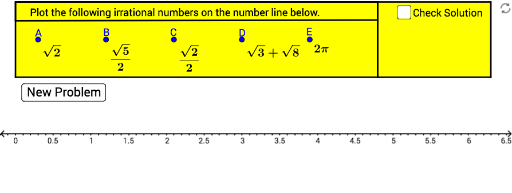
① This example demonstrates how to order irrational numbers by generating random irrational values and displaying their relative positions on a number line or in a list. ② Core mathematical concepts include comparing irrational numbers, density of real numbers, and positional relationships on the number line, along with random number generation and linear regression as statistical tools. ③ Construction highlights: using GeoGebra commands such as Random to generate irrational numbers, Element and Remove to manage list items, Segment and Polygon to build the number line and auxiliary shapes, Point to mark numerical positions, and multiple text objects (text1 to text18) to dynamically show sorting results and explanations. ④ Suitable for middle school to high school students learning real numbers and inequalities, and useful for classroom demonstrations or self-exploration of ordering irrational numbers.
GeoGebra Commands & Parameters
Random(1, 12) → aElement(list1, a, 1) → text14Element(list1, a, 2) → fRandom(1, 11) → bRemove(list1, {{Element[list1, a, 1], Element[list1, a, 2]}}) → list2Random(1, 10) → cRemove(list2, {{Element[list2, b, 1], Element[list2, b, 2]}}) → list3Random(1, 9) → dRemove(list3, {{Element[list3, c, 1], Element[list3, c, 2]}}) → list4Remove(list4, {{Element[list4, d, 1], Element[list4, d, 2]}}) → list5Element(list2, b, 1) → text15Element(list2, b, 2) → gElement(list3, c, 2) → hElement(list3, c, 1) → text16Element(list4, d, 1) → text17Element(list4, d, 2) → iRandom(1, 8) → eElement(list5, e, 2) → jElement(list5, e, 1) → text18Segment(A, A_1) → kSegment(B, B_1) → lSegment(C, C_1) → mSegment(D, D_1) → nSegment(E, E_1) → pPolygon(K, L, M, N) → poly1, k_1, l_1, m_1, n_1Polygon(N, O, P, M) → poly2, n_2, o, p_1, m_2Point(k_1) → FPoint(m_1) → GPolygon(F, G, N, K) → poly3, f_1, g_1, n_3, k_2
AI Drawing Prompt Reference
Create an interactive number line diagram for ordering irrational numbers. Draw a horizontal number line with five equally spaced base points, each connected by a vertical segment to a polygonal frame above. Inside the frames, randomly place five irrational numbers (e.g., square roots) with their values labeled. Below the line, arrange multiple text boxes showing comparison results and sorting explanations. The layout includes random values, auxiliary segments, polygon regions, and text annotations to visually demonstrate the positions and ordering of irrational numbers on the real line.
The prompt above was compiled from the original drawing commands and is for reference only.