
Modeling Inequalities with Algebra Tiles
Loading the math board and drawing, please wait…
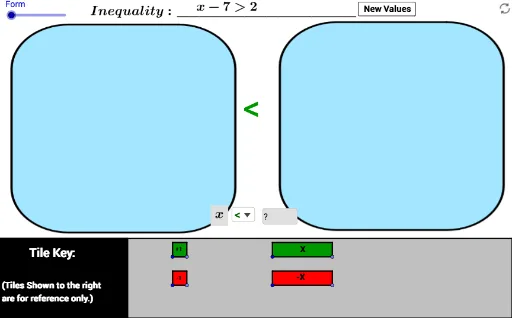
This example demonstrates the geometric representation of inequalities using algebra tiles, covering core math concepts like inequalities, algebraic operations, and geometric intuition. It utilizes GeoGebra commands such as Random, RandomElement, Segment, Polygon, etc., making it suitable for middle school and above students to explore the connection between algebra and geometry in understanding inequalities and geometric models.
GeoGebra Commands & Parameters
Random(1, 4) → c_4RandomElement(list3) → u_1SelectedIndex(L_2) → c_5RandomElement(list2) → b_1RandomElement(list2) → d_1Element(list12, A4) → B4Intersect(B4, xAxis) → VElement(list11, A3) → B3Intersect(B3, xAxis) → UElement(list10, A2) → B2Intersect(B2, xAxis) → TRandom(1, 5) → b_2RandomElement(list4) → a_2If(a_2 ≤ 0, b_2, a_2 + b_2) → c_2SelectedIndex(list1) → oRandomElement(list2) → a_1Element(list9, A1) → t_2Intersect(t_2, xAxis) → SRandom(1, 4) → c_4If(u ≟ 1 ∧ c_5 ≟ c_4, 1, If[u ≟ 2 ∧ b_1 ≥ 0 ∧ c_5 ≟ c_4, 1, If[u ≟ 2 ∧ b_1 < 0 ∧ c_5 ≟ 1 ∧ c_4 ≟ 2, 1, If[u ≟ 2 ∧ b_1 < 0 ∧ c_5 ≟ 2 ∧ c_4 ≟ 1, 1, If[u ≟ 2 ∧ b_1 < 0 ∧ c_5 ≟ 3 ∧ c_4 ≟ 4, 1, If[u ≟ 2 ∧ b_1 < 0 ∧ c_5 ≟ 4 ∧ c_4 ≟ 3, 1, If[u ≟ 3 ∧ u_1 ≥ 0 ∧ c_5 ≟ c_4, 1, If[u ≟ 3 ∧ u_1 < 0 ∧ c_5 ≟ 1 ∧ c_4 ≟ 2, 1, If[u ≟ 3 ∧ u_1 < 0 ∧ c_5 ≟ 2 ∧ c_4 ≟ 1, 1, If[u ≟ 3 ∧ u_1 < 0 ∧ c_5 ≟ 3 ∧ c_4 ≟ 4, 1, If[u ≟ 3 ∧ u_1 < 0 ∧ c_5 ≟ 4 ∧ c_4 ≟ 3, 1, 0]]]]]]]]]]) → c_6Corner(1) → ACorner(2) → BCorner(3) → CCorner(4) → DSegment(A, B) → fSegment(A, D) → gPolygon(F, E, A, B) → poly1, a, d, e, f_1Point(Circle[G, 1]) → HSegment(G, H) → hPolygon(G, H, 4) → poly2, i, j, k, l, I, JPoint(Circle[G_1, 1]) → H_1Segment(G_1, H_1) → h_1Polygon(G_1, H_1, 4) → poly2_1, i_1, j_1, k_1, l_1, I_1, J_1Segment(J, H) → rSegment(I, G) → sSegment(I_1, G_1) → tSegment(J_1, H_1) → g_1Intersect(r, s) → OIntersect(t, g_1) → PPolygon(E, A_1, B_1, A) → poly5, b, j_2, p_2, q_2Circle(K, 4.2) → cCircle(K, 1) → qPoint(c) → LLine(K, L) → mOrthogonalLine(K, m) → nOrthogonalLine(L, m) → pIntersect(q, n, 2) → MOrthogonalLine(M, n) → m_1Intersect(p, m_1) → NPolygon(K, L, N, M) → poly3, k_2, l_2, n_1, m_2Distance(N, K) → distanceNKCircle(K_1, 4.2) → c_1Circle(K_1, 1) → q_1Point(c_1) → L_1Line(K_1, L_1) → m_4OrthogonalLine(K_1, m_4) → n_3OrthogonalLine(L_1, m_4) → p_1Intersect(q_1, n_3, 2) → M_1OrthogonalLine(M_1, n_3) → m_5Intersect(p_1, m_5) → N_1Polygon(K_1, L_1, N_1, M_1) → poly3_1, k_3, l_3, n_2, m_3Distance(N_1, K_1) → distanceNK_1Distance(K_1, N_1) → distanceK1N1Random(1, 10) → vRandom(1, 10) → wRandom(1, 3) → e_1Random(1, 3) → o_1RandomElement(list3) → v_1RandomElement(list3) → w_1Intersect(i_2, xAxis) → QElement(list5, c_4) → text14Intersect(s_2, xAxis) → RElement(list6, A2) → text16Element(list7, A3) → text18Element(list8, A4) → text20If(a_2 ≤ 0, b_2, a_2 + b_2) → c_2If(o ≟ 2 ∧ u ≟ 1 ∧ A6 ≟ B6 ∧ c_6 ≟ 1, 1, If[o ≟ 2 ∧ u ≟ 2 ∧ A6 ≟ B7 ∧ c_6 ≟ 1, 1, If[o ≟ 2 ∧ u ≟ 3 ∧ A6 ≟ B8 ∧ c_6 ≟ 1, 1, If[o ≟ 2 ∧ u ≟ 4 ∧ A6 ≟ B9, 1, If[o ≟ 2 ∧ u ≟ 5 ∧ A6 ≟ B10, 1, If[o ≟ 2 ∧ u ≟ 6 ∧ A6 ≟ B11, 1, 0]]]]]) → C6Textfield(A6) → InputBox1SelectedElement(L_2) → text24Element(L_2, c_4) → text25If(a_2 ≤ 0, b_2, a_2 + b_2) → c_2
AI Drawing Prompt Reference
Draw a geometric representation of inequalities using algebra tiles. Start by plotting a coordinate system and placing several points randomly on the x-axis, then connect these points to form polygons. Add geometric elements like circles and lines inside the shape to represent different parts of the inequality. Combine these elements to create a complete geometric model that illustrates the connection between algebraic operations and geometric intuition.
The prompt above was compiled from the original drawing commands and is for reference only.