
Comparing Two Quantities by Percentage
Loading the math board and drawing, please wait…
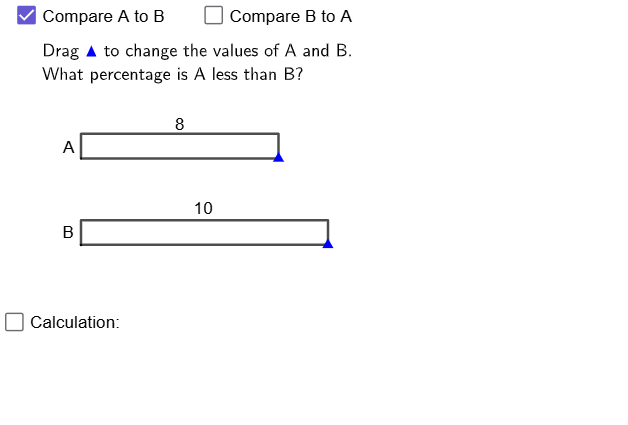
This GeoGebra example visually compares two quantities using percentage-based change or difference, showing how the percent relationship maps to corresponding computed results on the same diagram. It centers on key ideas from percentages (interpreting relative change with respect to a baseline), and relates numeric comparison to visual, geometry-anchored calculations that support understanding of expected/representative values. Construction-wise, it uses GeoGebra commands such as Point to place key values, Segment plus PolyLine/Polygon to build comparison shapes, Sequence to generate/update values, If together with Div and Mod for conditional logic and integer division/remainder behavior, and Mirror to create symmetric visual comparisons. Various labeled objects (including multiple value points and num variables) are used to store quantities and outcomes, while text objects (e.g., text5/text8/text10) present the computed answers (ans1/ans2) after simplification (simplify). Suitable for secondary-school learners studying percentages and relative change, as well as for classroom visualization and practice exercises.
GeoGebra Commands & Parameters
Point(Sequence[A + (i, 0), i, 1, 24]) → PPoint(Sequence[B + (i, 0), i, 1, 24]) → QGCD(num1 - num2, If[a, num2, num1]) → hcfPolygon({A, P, P + (0, 1), A + (0, 1)}) → q1Polygon({B, Q, Q + (0, 1), B + (0, 1)}) → q2Sequence(Translate[pic1, Vector[A + (i - 1, 0)]], i, 1, num1) → l1Sequence(Translate[pic2, Vector[B + (i - 1, 0)]], i, 1, num2) → l2Polygon({P, (x(Q), y(P)), (x(Q), y(P) + 1), P + (0, 1)}) → q3Polygon({Q, Q + (x(P) - x(Q), 0), Q + (x(P) - x(Q), 1), Q + (0, 1)}) → q4PolyLine(C + (0, 0.3), C + (0, 0.5), ((x(C) + x(D)) / 2, y(C) + 0.5), ((x(C) + x(D)) / 2, y(C) + 0.7), ((x(C) + x(D)) / 2, y(C) + 0.5), D + (0, 0.5), D + (0, 0.3)) → fMirror(f, y = y(A) + 0.5) → f'Segment(Q + (0, 1), If[x(P) < x(Q), D - (0, 1), C - (0, 1)]) → gPolyLine(E + (0, 0.3), E + (0, 0.5), ((x(E) + x(F)) / 2, y(E) + 0.5), ((x(E) + x(F)) / 2, y(E) + 0.7), ((x(E) + x(F)) / 2, y(E) + 0.5), F + (0, 0.5), F + (0, 0.3)) → iMirror(i, y = y(B) + 0.5) → i'If(hcf > 1 ∨ abs(num1 - num2) ≥ If[a, num2, num1], true, false) → simplifyDiv(abs(num1 - num2), If[a, num2, num1]) → ainteger_1Mod(abs(num1 - num2) / hcf, If[a, num2, num1] / hcf) → anumeratorPolyLine(B - (0, 0.3), B - (0, 0.5), ((x(B) + x(Q)) / 2, y(Q) - 0.5), ((x(B) + x(Q)) / 2, y(B) - 0.7), ((x(B) + x(Q)) / 2, y(B) - 0.5), Q - (0, 0.5), Q - (0, 0.3)) → hPolyLine(A - (0, 0.3), A - (0, 0.5), ((x(A) + x(P)) / 2, y(P) - 0.5), ((x(A) + x(P)) / 2, y(A) - 0.7), ((x(A) + x(P)) / 2, y(A) - 0.5), P - (0, 0.5), P - (0, 0.3)) → j
AI Drawing Prompt Reference
In one coordinate plane, use a baseline pair of quantities (start from A and B) and their related values to place two horizontal rows of equally spaced points, each row generated from its own start position. Build two matching bar-like polygons by connecting the start point, a chosen generated point, and the corresponding points shifted up by a unit height, so the two quantities are visually compared. Create additional polyline shapes by connecting key endpoints between the rows, then produce symmetric counterparts by mirroring those polylines across an appropriate horizontal line. Add final small text labels to display simplified computed outcomes derived from the comparison, reflecting the relationship between the two quantities. Construct first the point rows and base polygons, then the connecting polylines and mirrored parts, and finally the result text.
The prompt above was compiled from the original drawing commands and is for reference only.