
Solving for Sides in a Right Triangle
Loading the math board and drawing, please wait…
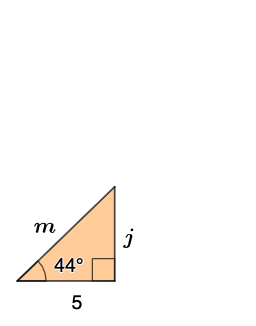
This example demonstrates how to solve for the sides of a right triangle. Key mathematical concepts include sine, cosine, tangent, and their applications in similar triangles. Using GeoGebra commands such as Point, Random, Rotate, etc., the process is dynamically illustrated. Suitable for middle school and above students to learn trigonometry and geometric construction.
GeoGebra Commands & Parameters
Point(yAxis) → ASequence(i, i, 3, 10, 1) → opplist, {3, 4, 5, 6, 7, 8, 9, 10}Random(1, 3) → nRandomElement(opplist) → oppSequence(i, i, 3, 8, 1) → adjlist, {3, 4, 5, 6, 7, 8}RandomElement(adjlist) → adjSequence(i, i, 3, 13, 1) → hyplist, {3, 4, 5, 6, 7, 8, 9, 10, 11, 12, 13}RandomElement(hyplist) → hypRandom(35, 65) → angRotate(B, (ang * π / 180), A) → B'Ray(A, B') → fIntersect(f, eq1) → DAngle(B, A, B') → αSegment(C, D) → gPolygon(A, C, D) → t1, d, a, cAngle(D, C, A) → βIntersect(eq2, f) → FPolygon(A, E, F) → t2, f_1, a_1, eAngle(F, E, A) → γSegment(A, E) → hCircle(A, hyp) → kIntersect(k, f) → G,Intersect(eq3, xAxis) → HSegment(G, H) → iSegment(A, G) → jPolygon(A, G, H) → t3, h_1, a_2, g_1Segment(A, H) → lAngle(G, H, A) → δSegment(A, D) → mSegment(A, C) → pSegment(A, F) → qSegment(F, E) → rTextfield(jans) → InputBox1Textfield(kans) → InputBox2Textfield(hypans) → InputBox3If(jcorrect, "√", "X") → text8If(mcorrect, "√", "X") → text9If(kcorrect, "√", "X") → text10Textfield(jansa) → InputBox4Textfield(kansa) → InputBox5Textfield(hypansa) → InputBox6If(jacorrect, "√", "X") → text2If(kacorrect, "√", "X") → text3If(hypacorrect, "√", "X") → text4
AI Drawing Prompt Reference
On a coordinate plane, start with the vertical and horizontal axes and choose a point as a reference vertex of a right-triangle setup. Pick a random acute angle and draw a ray from the reference point so that the marked angle at the vertex corresponds to α. Construct the second and third vertices by intersecting the ray with the needed lines and connecting points so the right-triangle shape is formed, marking the other key angles as β, γ, and δ. Then draw a circle centered at the reference vertex with a given random radius (the intended hypotenuse-related length) and intersect it with the constructed ray to obtain the additional intersection point. Connect the relevant vertices to form the main triangle and the associated polygonal outline, and provide blank input boxes for the user to enter the three side lengths and whether they are correct.
The prompt above was compiled from the original drawing commands and is for reference only.