
Solving a Linear System Using Elimination (LR6-02-CYU3)
Loading the math board and drawing, please wait…
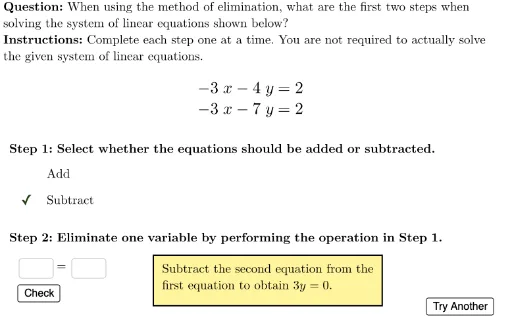
This interactive example demonstrates how to solve a system of two linear equations using the elimination method (addition/subtraction). The core mathematical concept is algebraic solving of linear systems, involving aligning coefficients, adding or subtracting equations to eliminate one variable, solving for the other, and back-substituting. The construction uses GeoGebra's Textfield, LaTeX, and Button objects to create a user-friendly interface, with Element and UnicodeToText commands to manage question lists and random generation. It also includes visual aids via Polygon and coordinate viewBox, and step-checking mechanisms (isStep1Correct, isStep2Correct) to validate user input. Suitable for middle school to high school students learning linear equations, useful for classroom practice or self-study.
GeoGebra Commands & Parameters
Element(questionList, questionListIndex) → questionNumElement(G2:G9, questionNum) → correctRHS2Element(F2:F9, questionNum) → correctLHS2Element(E2:E9, questionNum) → correctRHS1UnicodeToText(TextToUnicode[userLHS] \ {32}) → userLHSnoSpaceUnicodeToText(TextToUnicode[userRHS] \ {32}) → userRHSnoSpaceElement(C2:C9, questionNum) → addOrSubtractPolygon({(-11, -11), (-11, 11), (11, 11), (11, -11)}) → viewBoxLaTeX((((("\text{" * QUESTION) * "\\") * INSTRUCTIONS) * "}")) → TEXTTextfield(userLHS) → ansLHSTextfield(userRHS) → ansRHSLaTeX("=") → equalSignElement(D2:D9, questionNum) → correctLHS1UnicodeToLetter(10003) → cmarkStep1LaTeX("\text{Step 1: Select whether the equations should be added or subtracted.}") → step1InstructionsLaTeX("\text{Step 2: Eliminate one variable by performing the operation in Step 1.}") → step2InstructionsLaTeX("\fcolorbox{black}{#fff59d}{\text{If coefficients are the same, we subtract.\\If coefficients have opposite signs, we add.}}") → feedbackStep1LaTeX("\text{Add}") → labelAddLaTeX("\text{Subtract}") → labelSubtractElement(A2:A9, questionNum) → equation1Element(B2:B9, questionNum) → equation2
AI Drawing Prompt Reference
Create an interactive teaching interface for solving a linear system by elimination. The background is a square coordinate plane. In the center, display two linear equations, each with a text field for the left-hand side, an equals sign, and a text field for the right-hand side. Above, show a title and instructions. Below, provide two steps: first, buttons labeled 'Add' and 'Subtract' for choosing the operation; second, a space for entering the eliminated equation. Include a yellow highlighted box explaining that same coefficients mean subtract, opposite signs mean add. Show a checkmark when a step is correct.
The prompt above was compiled from the original drawing commands and is for reference only.