
Solve One-Step Equations by Multiplying or Dividing
Loading the math board and drawing, please wait…
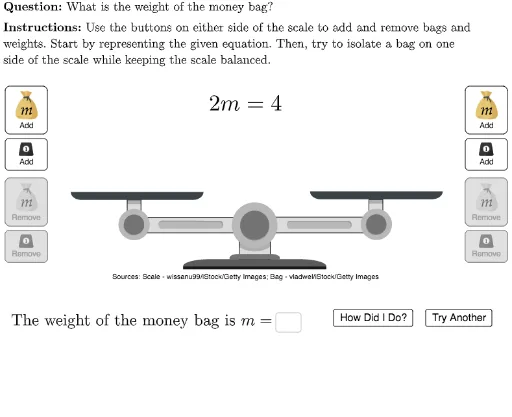
This example demonstrates solving one-step equations by multiplying or dividing. Key math concepts include the solution methods for one-step equations. GeoGebra commands used include Random, UnicodeToLetter, If, Polygon, Join, LaTeX, and Textfield. Suitable for middle school math education.
GeoGebra Commands & Parameters
Random(1, 4) → mUnicodeToLetter(10007) → xmarkUnicodeToLetter(10003) → cmarkIf(m ≟ 1 ∨ m ≟ 2, Random[2, 4], 2) → leftOperandPolygon(A, leftScaleRegionCorner, C, D) → leftScaleRegion, a, b, c, dPolygon(I, rightScaleRegionCorner, K, L) → rightScaleRegion, i, j, k, lJoin({Sequence[C + ((-1.8 * i), 0), i, 1, Min[numWeightsLeft, 4]], Sequence[C + ((-1.8 * i), 1.5), i, 1, Min[numWeightsLeft - 4, 4]]}) → leftRegionWeightCornersJoin({Sequence[K + ((-1.8 * i), 0), i, 1, Min[numWeightsRight, 4]], Sequence[K + ((-1.8 * i), 1.5), i, 1, Min[numWeightsRight - 4, 4]]}) → rightRegionWeightCornersJoin({Sequence[leftScaleRegionCorner + (-1.5, 0) + ((2 * i), 0), i, 0, Min[numBagsLeft, 2] - 1], Sequence[leftScaleRegionCorner + (-1.5, 0) + ((2 * i), 2.5), i, 0, Min[numBagsLeft - 2, 2] - 1]}) → leftRegionBagCornersJoin({Sequence[rightScaleRegionCorner + (-1.5, 0) + ((2 * i), 0), i, 0, Min[numBagsRight, 2] - 1], Sequence[rightScaleRegionCorner + (-1.5, 0) + ((2 * i), 2.5), i, 0, Min[numBagsRight - 2, 2] - 1]}) → rightRegionBagCornersLaTeX("\text{\textbf{Instructions: }Use the buttons on either side of the scale to add and remove bags and\\weights. Start by representing the given equation. Then, try to isolate a bag on one\\side of the scale while keeping the scale balanced.}") → SpecInstrucTextfield(answerText) → answerBoxLaTeX("\text{The weight of the money bag is }m=") → answerLineLaTeX("\text{\textbf{Question: }What is the weight of the money bag?}") → MainInstrucLaTeX("\text{Please enter the weight of the money bag.}") → remember
AI Drawing Prompt Reference
Draw a scale with two sides representing equation expressions, each side having regions with varying shapes and weights to symbolize different values in the equation. Include a text box in the middle showing the solution to the equation, and buttons on either side to add or remove weights, visually demonstrating the process of solving one-step equations.
The prompt above was compiled from the original drawing commands and is for reference only.