
Snub Cube Construction
Loading the math board and drawing, please wait…
In collections
Archimedean Solids
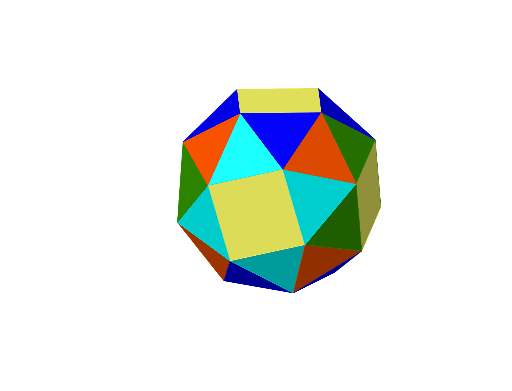
This example demonstrates the construction of a snub cube, a type of Archimedean solid consisting of 32 faces: 30 equilateral triangles and 2 squares. Using GeoGebra commands such as Polygon, Line, OrthogonalLine, Circle, Intersect, Rotate, Centroid, Plane, and Point, an accurate geometric model of the snub cube can be created. Suitable for high school mathematics education and students learning solid geometry.
GeoGebra Commands & Parameters
Polygon(A, B, 4, xOyPlane) → poly1, f, g, h, i, C, DLine(D, C) → jOrthogonalLine(D, poly1) → kCircle(k, C) → cOrthogonalLine(C, poly1) → lCircle(l, D) → dIntersect(d, c) → E, F, ,Rotate(E, -142.98°, j) → E'Polygon(E', D, C) → t1, c_1, e', d_1Centroid(poly1) → GOrthogonalLine(G, poly1) → mRotate(t1, 90°, m) → t1'Rotate(E', 90°, m) → E''Rotate(t1, 180°, m) → t1'_{1}Rotate(E', 180°, m) → E''_{1}Rotate(t1, 270°, m) → t1'_{2}Rotate(E', 270°, m) → E''_{2}Line(E', D) → nRotate(t1, 153.23°, n) → t1'_{3}Rotate(C, 153.23°, n) → C'Rotate(t1'_{3}, 90°, m) → t2Rotate(C', 90°, m) → C''Rotate(t2, 90°, m) → t2'Rotate(C'', 90°, m) → C'''Rotate(t2', 90°, m) → t2''Rotate(C''', 90°, m) → HCentroid(t2) → IOrthogonalLine(I, t2) → pRotate(t1', 120°, p) → t1''Polygon(E'', D, C') → t3, c', e'', d_2Rotate(t1'', 90°, m) → t1'''_{1}Rotate(t1'''_{1}, 90°, m) → t4Line(C', E') → qRotate(D, -142.98°, q) → D'Plane(C', D', E') → rPoint(p) → JOrthogonalLine(C', r) → sRotate(E', -90°, s) → E''_{3}OrthogonalLine(E', r) → tPolygon(E''_{3}, C', E', C''_{1}) → q1, e''_{3}, a, b, c''_{1}Rotate(q1, 90°, m) → q1'Rotate(q1, 180°, m) → q1'_{1}Rotate(q1, 270°, m) → q1'_{2}Rotate(E''_{3}, 90°, m) → KRotate(C''_{1}, 90°, m) → LRotate(K, 90°, m) → K'Rotate(L, 90°, m) → L'Rotate(K', 90°, m) → K''Rotate(L', 90°, m) → L''Polygon(C''', L'', E''_{2}) → t5, e''_{2}, c''', l''Rotate(t5, 90°, m) → t5'Rotate(t5, 180°, m) → t5'_{1}Rotate(t5, 270°, m) → t5'_{2}Polygon(K', L'', C''') → t6, e, k', f_1Rotate(t6, 90°, m) → t6'Rotate(t6, 180°, m) → t6'_{1}Rotate(t6, 270°, m) → t6'_{2}Centroid(q1') → MOrthogonalLine(M, d_1, space) → g_1Centroid(q1'_{2}) → NOrthogonalLine(N, q1'_{2}) → h_1Rotate(t6', -90°, h_1) → t6''Rotate(C''_{1}, -90°, h_1) → ORotate(t6'', 90°, m) → t6'''Rotate(t6'', 180°, m) → t6'''_{1}Rotate(t6'', 270°, m) → t6'''_{2}Rotate(O, 90°, m) → O'Rotate(O, 270°, m) → O'_{1}Rotate(O, 180°, m) → O'_{2}Polygon(O'_{2}, E''_{3}, L) → t7, l_1, o'_{2}, i_1Rotate(t7, 90°, m) → t7'Rotate(t7, 180°, m) → t7'_{1}Rotate(t7'_{1}, 90°, m) → t8Polygon(O'_{1}, O, K') → t9, j_1, o'_{1}, oRotate(t9, 90°, m) → t9'Rotate(t9, 90°, m) → t9'_{1}Rotate(t9'_{1}, 90°, m) → t10Rotate(t10, 90°, m) → t10'Polygon(O, O', O'_{2}, O'_{1}) → q2, o_1, o', k_1, m_1
AI Drawing Prompt Reference
Draw a snub cube consisting of 30 equilateral triangles and 2 squares. Start by drawing a square, then draw equilateral triangles around its sides. Use rotation and mirroring operations to build the remaining faces. Ensure all faces are correctly connected to form a complete snub cube.
The prompt above was compiled from the original drawing commands and is for reference only.