
Smallest Possibility? by Tim Brzezinski
Loading the math board and drawing, please wait…
In collections
Open Middle: Distance in the Coordinate Plane
This example demonstrates how to find the smallest possibility using a geometric distribution. It involves the concept of geometric distribution, showcasing random point distribution in geometric shapes. The construction uses commands such as PointIn, Segment, SurdText, Textfield, Point, If, Mode, Intersect, Polygon, Angle. Suitable for high school mathematics education and learning probability statistics.
GeoGebra Commands & Parameters
PointIn(e) → APointIn(e) → BSegment(A, B) → fSurdText(f) → text1Textfield(j) → InputBox1Textfield(k) → InputBox2Point(Circle[A, sqrt((10 * j) + k)]) → CSegment(A, C) → lIf(m < i, "Too short!", m > i, "Too long!", "This value is correct!") → text7Mode(l1) → l2If(Length[l2] ≟ 0, "No digits repeat!", "Repeated digits exist.") → text8Intersect(eq1, p) → DPolygon(A, D, B) → t1, b_1, a_1, d_1Segment(A, D) → qSegment(D, B) → rAngle(B, D, A) → α
AI Drawing Prompt Reference
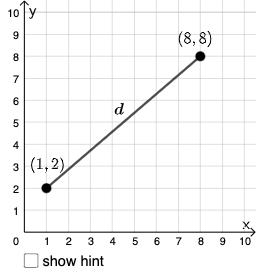
On one coordinate plane, construct a probability-geometry diagram centered on a geometric-distribution idea: place two points A and B and draw the segment AB between them, then add a small text label for this segment. Use two user inputs j and k to determine a circle radius via a square-root expression and place a point C on the circle with center A. Connect A to C to form segment AC, then apply a digit/rounding-like mode to obtain the derived segment used for checking whether repeated digits occur, and display the corresponding status text. Determine a point D by intersecting the relevant relation associated with the derived segment and the chosen structure. Draw the polygon/triangle formed by A, D, and B, and at point D mark the angle with rays DA and DB (labeled α), with the input boxes and the messages shown directly on the figure.
The prompt above was compiled from the original drawing commands and is for reference only.