
Slope Quiz II: Interactive Slope Estimation Practice
Loading the math board and drawing, please wait…
In collections
COORDINATE GEOMETRY
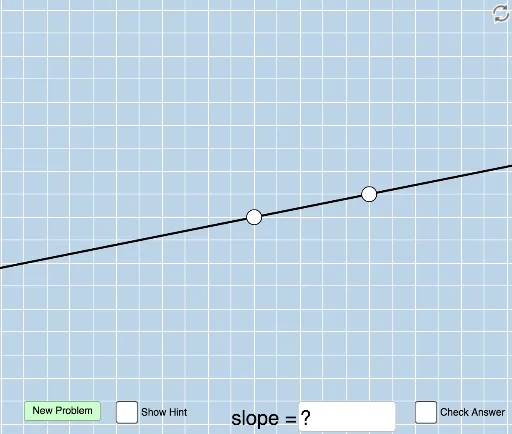
① This interactive quiz generates random lines and asks users to estimate the slope by visual inspection, providing immediate feedback to reinforce understanding of the slope concept. ② Core mathematical concepts include the definition of slope as the ratio of vertical change to horizontal change, the relationship between positive/negative slope and line direction, and calculating slope from two points. ③ Construction highlights: GeoGebra commands such as Sequence and Random generate random points and lines, Line draws the line, Slope computes the slope, FractionText displays the slope as a fraction, Intersect finds intersection points, Polygon builds auxiliary triangles, Vector and Angle illustrate direction and inclination, Textfield and InputBox allow user input, button1 triggers checking, and text objects show feedback. ④ Suitable for middle and high school students learning linear functions and coordinate geometry, as well as teachers for classroom demonstrations or self-paced practice to sharpen intuitive slope recognition.
GeoGebra Commands & Parameters
Sequence(i, i, -10, -1) → aSequence(i, i, -5, 5) → wSequence(i, i, -10, -1) → bSequence(i, i, 1, 10) → cUnion(b, c) → dRandom(-12, 12) → eLine(A, B) → gFractionText(Slope[f]) → text1FractionText(f(0)) → text2Intersect(h, i) → CPolygon(A, C, B) → poly1, b_1, a_1, c_1Vector(A, C) → uVector(C, B) → vAngle(B, C, A) → αDistance(A, C) → distanceACDistance(C, B) → distanceCBTextfield(n) → InputBox1Line(A, B) → pSlope(p) → oFractionText(n) → text3FractionText(n) → text6
AI Drawing Prompt Reference
Create an interactive slope estimation practice diagram. On a coordinate plane, draw a randomly generated straight line and show its intersections with the axes. Below the line, construct a right triangle with legs parallel to the axes to visually represent the vertical and horizontal changes. Mark a right angle symbol at the triangle's vertex, and use arrow vectors to indicate horizontal and vertical displacements. Place an input box beside the diagram for the user to enter an estimated slope value. Also display a fraction text showing the user's input. The overall figure includes a coordinate grid, a random line, an auxiliary triangle, direction vectors, an angle marker, and an input interaction area.
The prompt above was compiled from the original drawing commands and is for reference only.