
Connecting Factors and Zeros: Exploring Quadratic Functions
Loading the math board and drawing, please wait…
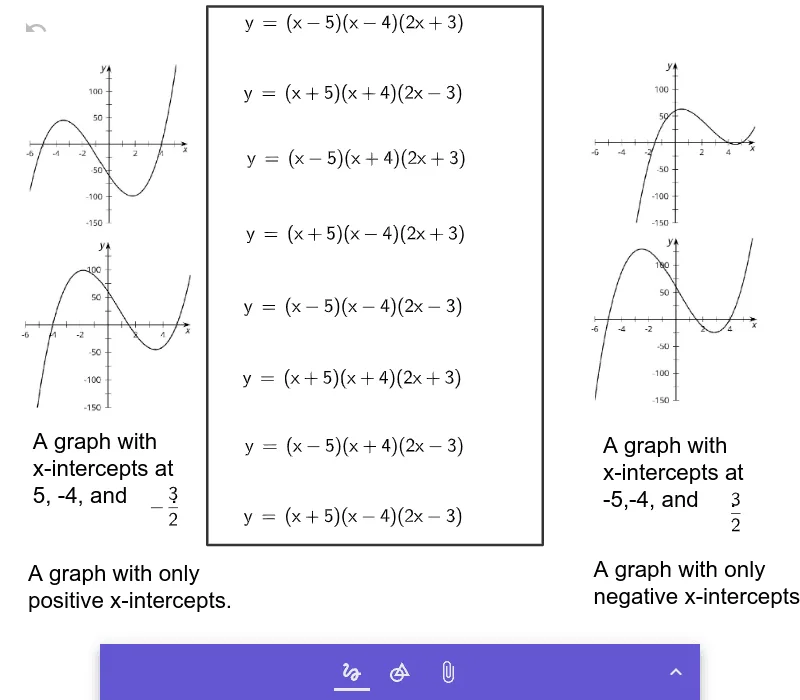
This GeoGebra example demonstrates the relationship between the factored form of a quadratic polynomial and the zeros of its graph, showing how changing factors shifts the x-intercepts dynamically. Core mathematical concepts include polynomial factors, zeros (roots), graph intersections with the x-axis, and the algebraic-geometric connection between factors and zeros. Construction notes: based on the summary, the example uses the Polygon command to create multiple polygon objects (a through h, q1) and references several image objects (pic1 to pic4), likely to display function graphs, axes, or explanatory visuals. The interactive layout allows users to manipulate parameters and observe resulting changes. Suitable for high school algebra or precalculus courses, this resource helps students understand the factor theorem and the meaning of zeros, and can be used for teacher demonstrations or independent student exploration.
GeoGebra Commands & Parameters
Polygon((-2.8491293151191805, -2.899792146387005), (1.9159980069775806, -2.899792146387005), (1.9159980069775806, 4.748172723388888), (-2.8491293151191805, 4.748172723388888)) → q1
AI Drawing Prompt Reference
Draw a rectangular region with vertices at approximately (-2.85, -2.90), (1.92, -2.90), (1.92, 4.75), and (-2.85, 4.75). Inside this rectangle, display a quadratic function graph in factored form, where the x-intercepts (zeros) shift as parameters change. Include coordinate axes and possibly explanatory labels or images within the rectangle to illustrate the connection between factors and zeros. The layout should be clear for observing how the graph intersects the x-axis dynamically.
The prompt above was compiled from the original drawing commands and is for reference only.