
Intuitive Idea of Slope: A Color-Coded Discovery Lesson
Loading the math board and drawing, please wait…
In collections
COORDINATE GEOMETRY
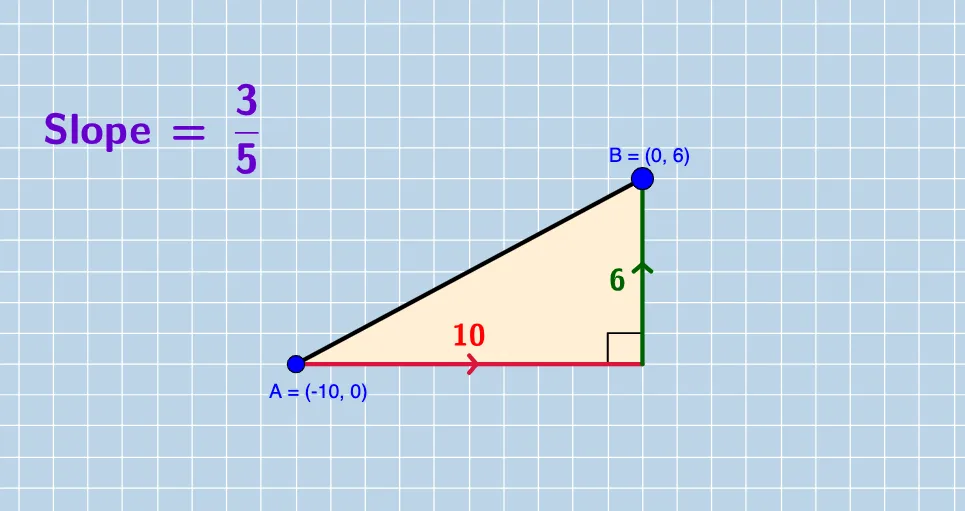
① This interactive GeoGebra example demonstrates the concept of slope of a line through dynamic visualization, enabling students to discover the four main types of slope (positive, negative, zero, undefined) on their own. ② Core mathematical concepts include the definition of slope as the ratio of vertical change (deltaY) to horizontal change (deltaX), linear equations, coordinate geometry, and the relationship between slope and the steepness of a line. ③ Construction highlights: uses GeoGebra commands such as Slope to compute slope directly, GCD to simplify fractional slopes, If for conditional sign detection, OrthogonalLine to construct perpendicular lines, Polygon to form right triangles illustrating deltaY and deltaX, Distance and Segment for measuring lengths, Angle for displaying related angles, and numerous text objects (textSign, textslopeN, etc.) for color-coded dynamic labeling. ④ Suitable for middle school to high school students as an inquiry-based classroom activity on linear functions and slope, also useful for teacher demonstrations or self-directed discovery learning.
GeoGebra Commands & Parameters
GCD(deltaY, deltaX) → GCDmGCD(numerYint, deltaX) → GCDyIf(sgn(deltaY / deltaX) ≥ 0, "", "-") → textSignNIf(sgn(numerYint / deltaX) > 0, "+", "-") → textSignIf(deltaXR ≟ 1, textSignN + deltaYR, textSignN + "\, \frac{" + deltaYR + "}{" + deltaXR + "}") → textslopeNIf(denomYintR ≟ 1, textSign + numerYintR, textSign + "\frac{" + numerYintR + "}{" + denomYintR + "}") → textYintIf(denomYintR ≟ 1, If[numerYintR ≟ 1, textSign, textSign + numerYintR], textSign + "\frac{" + numerYintR + "}{" + denomYintR + "}") → textMIDOrthogonalLine(B, xAxis) → a_2OrthogonalLine(A, yAxis) → cIntersect(a_2, c) → CLine(A, B) → dPolygon(A, B, C) → poly1, c_1, a_1, b_1Distance(B, C) → distanceBCDistance(A, C) → distanceACIntersect(a_2, c) → DSegment(A, D) → eSegment(C, B) → fGCD(deltaY_1, deltaX_1) → GCDm_1If(sgn(deltaY_1 / deltaX_1) ≥ 0, "", "-") → textSignN_1If(deltaXR_1 ≟ 1, textSignN_1 + deltaYR_1, textSignN_1 + "\, \frac{" + deltaYR_1 + "}{" + deltaXR_1 + "}") → textslopeN_1Line(A_1, B_1) → d_1Angle(B, D, A) → αSegment(A, B) → gGCD(deltaY_2, deltaX_2) → GCDm_2If(sgn(deltaY_2 / deltaX_2) ≥ 0, "", "-") → textSignN_2If(deltaXR_2 ≟ 1, textSignN_2 + deltaYR_2, textSignN_2 + "\, \frac{" + deltaYR_2 + "}{" + deltaXR_2 + "}") → textslopeN_2Line(A_2, B_2) → d_2Segment(A_2, B_2) → g_1GCD(deltaY_3, deltaX_3) → GCDm_3If(sgn(deltaY_3 / deltaX_3) ≥ 0, "", "-") → textSignN_3If(deltaXR_3 ≟ 1, textSignN_3 + deltaYR_3, textSignN_3 + "\, \frac{" + deltaYR_3 + "}{" + deltaXR_3 + "}") → textslopeN_3Line(A_3, B_3) → d_3Segment(A_3, B_3) → g_2Slope(g) → h
AI Drawing Prompt Reference
In a coordinate plane, draw two perpendicular axes and choose three points so that two different line segments are determined. For each line segment, construct a right triangle that visually separates the vertical change and horizontal change: drop perpendiculars from the endpoints to the corresponding axes, take their intersections, then connect the points to form the triangle’s base and height. Add color-coded labels near the triangles to indicate the sign of the slope (positive/negative/zero/undefined behavior) and display the slope as a simplified ratio using a fraction when needed. Measure and show the key angle associated with the construction, draw the corresponding lines through each pair of points, and finally label the computed slope value for each line.
The prompt above was compiled from the original drawing commands and is for reference only.