
Slope of a Line
Loading the math board and drawing, please wait…
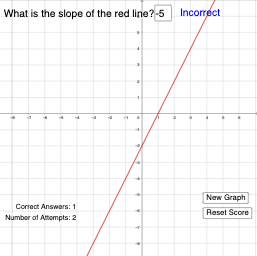
This example demonstrates how to determine the slope of a line using two points. Key mathematical concepts include linear equations and slope. It uses GeoGebra commands such as Random, Textfield, and If, with slider animation to adjust the slope and y-intercept. Suitable for middle school and above students to learn about linear equations and slope.
GeoGebra Commands & Parameters
Random(-5, 5) → mRandom(-5, 5) → bTextfield(userinput) → InputBox1If(m ≟ userinput, "Correct", "Incorrect") → ResponseIf(m ≟ userinput, "Correct", "Incorrect") → text1
AI Drawing Prompt Reference
Draw a coordinate plane with randomly generated lines, showing their slopes and y-intercepts. Use a slider to adjust the slope of one line, ask the user to input the correct slope, and display 'Correct' or 'Incorrect' feedback based on the input.
The prompt above was compiled from the original drawing commands and is for reference only.