
Sliding Trigon: Dynamic Triangle Transformations and Intersection Exploration
Loading the math board and drawing, please wait…
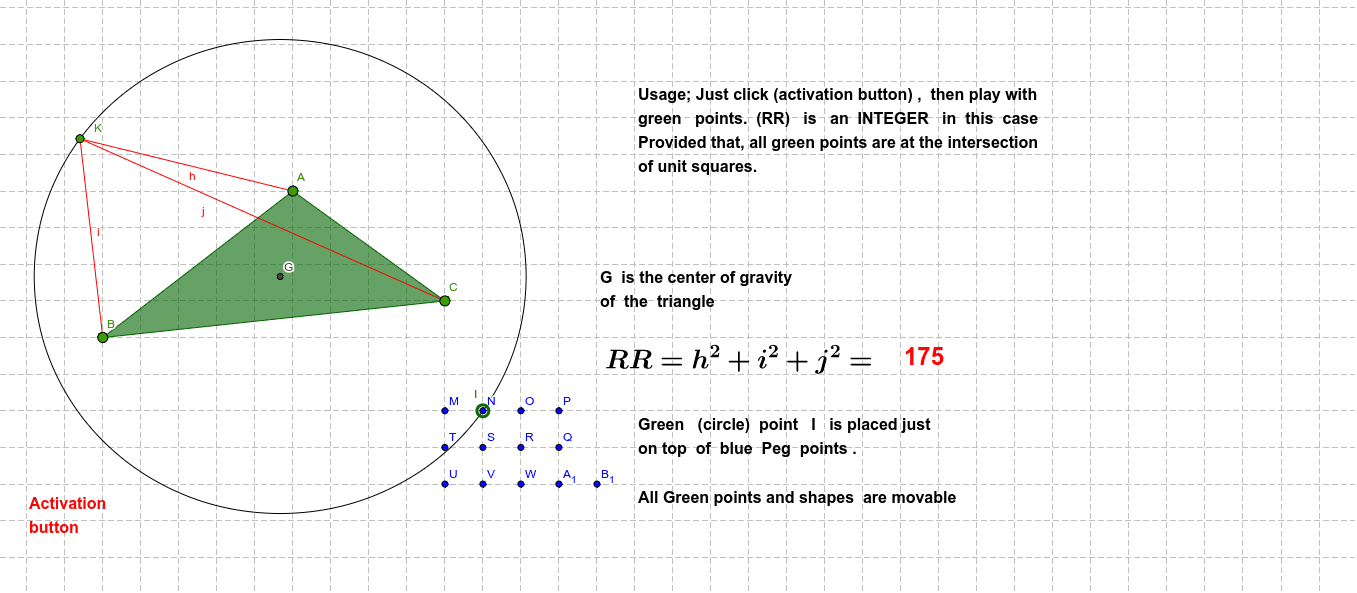
①This example demonstrates a sliding triangle (Sliding trigon) that moves dynamically on the plane, allowing users to drag or use sliders to change its position and shape, and observe how geometric elements such as vertices, sides, midpoints, and the orthocenter evolve and interact. ②Core mathematical concepts include triangle geometry (orthocenter, midpoints, altitudes), polygon construction, circle intersections, and the integration of functions and equations in geometric contexts, along with elements of probability and polynomials for a cross-disciplinary approach. ③Construction highlights: Based on the summary, the GeoGebra commands used include Polygon to create triangle poly1, Midpoint for midpoints, Segment for edges, Intersect for intersection points, Circle for circles, and Point for key points; objects include vertices A, B, C, sides a, b, c, midpoints D, E, F, and numerous auxiliary points (G, H, J, M, N, etc.) plus text labels (text1, text2, text3), with sliding achieved via sliders or dragging. ④Suitable for upper secondary to early university students in geometry and algebra courses, useful for exploring dynamic triangle properties, geometric transformations, and locus problems, as well as a model for interactive lesson design.
GeoGebra Commands & Parameters
Polygon(A, B, C) → poly1, c, a, bMidpoint(B, A) → EMidpoint(A, C) → FSegment(E, C) → dSegment(B, F) → eIntersect(d, e) → GSegment(G, D) → fMidpoint(D, G) → HCircle(G, I) → gPoint(g) → KSegment(K, A) → hSegment(K, B) → iSegment(K, C) → j
AI Drawing Prompt Reference
Draw a dynamically transforming triangle, showing the evolution and interaction of its vertices, sides, midpoints, and orthocenter. Use sliders or dragging to adjust the triangle's position and shape, and display the positions of midpoints, edges, intersection points, and auxiliary points. Draw the three edges of the triangle and mark their midpoints. Connect the midpoints to the vertices to form two line segments, and find their intersection point. Draw a circle centered at the intersection point, and take a point on the circle. Connect this point to the three vertices of the triangle to show the dynamic transformation process.
The prompt above was compiled from the original drawing commands and is for reference only.