
Sketching Reflections of Parabolas
Loading the math board and drawing, please wait…
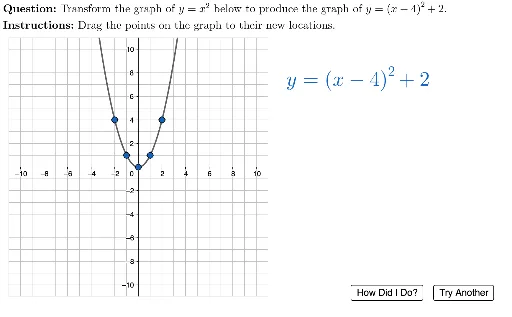
This example demonstrates how to sketch the reflections of parabolas using GeoGebra. Key mathematical concepts include parabolas, quadratic equations, and reflection transformations. Commands used include Polygon, PointIn, Element, and FitPoly. Suitable for high school mathematics education and learning.
GeoGebra Commands & Parameters
Polygon({(-11, -11), (-11, 11), (11, 11), (11, -11)}) → viewBoxPointIn(viewBox) → CPointIn(viewBox) → APointIn(viewBox) → BPointIn(viewBox) → EPointIn(viewBox) → DElement(questionList, questionListIndex) → questionNumLaTeX(UnicodeToLetter[10007]) → xmarkLaTeX(UnicodeToLetter[10003]) → cmarkElement(P2:P11, questionNum) → correctPointsElement(D2:D11, questionNum) → functionTextLaTeX((("\vphantom{\left(\tfrac{1}{2}\right)}" * functionText) * "")) → displayEquationLaTeX((((("\text{" * QUESTION) * "\\") * INSTRUCTIONS) * "}")) → TEXTFitPoly(startingPoints, 2) → fPolyFitPoly(correctPoints, 2) → gPolyDottedFitPoly(usersPoints, 2) → gPolySolidElement(A2:A11, questionNum) → aElement(B2:B11, questionNum) → hElement(C2:C11, questionNum) → k
AI Drawing Prompt Reference
Within a bounding box, draw two parabolas: one solid and one dashed, symmetric with respect to the center of the box. The solid parabola passes through multiple user points, while the dashed one passes through correct reference points. Four points are marked inside the box to assist in drawing and labeling.
The prompt above was compiled from the original drawing commands and is for reference only.