
Interactive Parabola in Vertex Form: Translation & Symmetry
Loading the math board and drawing, please wait…
In collections
The GeoGebra's Toolbox for Teachers and Students
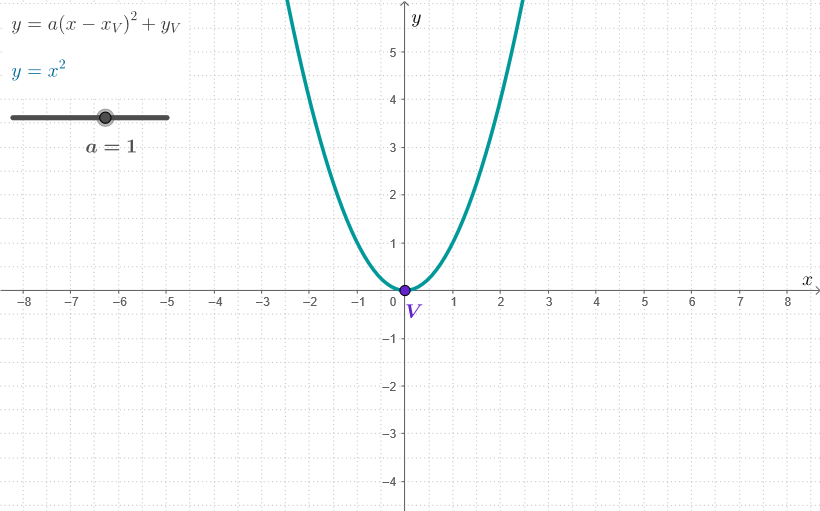
This GeoGebra example demonstrates, with interactive control, how a parabola’s graph changes when parameters in the vertex form are modified: the curve can translate to new positions while retaining its symmetry properties. It targets the visual relationship between the vertex-form equation and key geometric features such as the vertex, axis of symmetry, and coordinate-based interpretation. The construction emphasizes core ideas from analytic geometry and transformation: vertex form for parabolas, translations, symmetry, and reading/connecting function expressions to geometric loci. From the provided construction summary, it uses GeoGebra commands like Segment and Corner to build the guiding geometric elements, and objects such as V and a (vertex-related parameters), XC and YC (coordinate components), C_1 (auxiliary point), f and g (function/expression components), p (parameter/point set role), dims (dimension/label helpers), and testo3 (on-screen instructional elements). Suitable for secondary and early university learners, classroom demonstrations, and self-guided exploration of conic sections.
GeoGebra Commands & Parameters
Segment(V, XC) → fSegment(V, YC) → gCorner(5) → dims
AI Drawing Prompt Reference
Draw a parabola to show how changes in parameters in vertex form affect its position and symmetry through interactive controls. Display the vertex, axis of symmetry, and the connection to coordinates. Start by drawing line segments from the vertex to the x and y coordinates, then add an auxiliary point, and finally use the auxiliary point to construct a guiding geometric element to understand transformations and symmetry.
The prompt above was compiled from the original drawing commands and is for reference only.