
Square Root Functions Anatomy (Part 2)
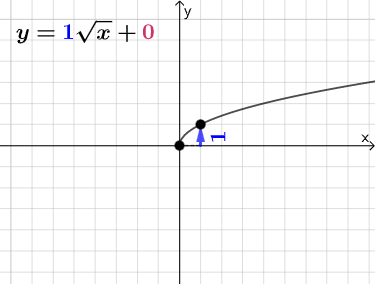
Loading the math board and drawing, please wait…
In collections
Square Root Function Anatomy: Exploration
① This GeoGebra example dynamically illustrates the anatomy of the square root function y = a√(x - h) + k, focusing on how parameters a, h, and k affect the graph's shape and position, with auxiliary elements like slopes and intercepts. ② Core mathematical concepts include domain and range of square root functions, horizontal and vertical translations, vertical stretching/compression, and algebraic relationships such as intersections with lines and slope calculations. ③ Construction details: from the summary, commands such as Point, Line, Vector, Polygon, RotateText, and Segment are used, creating objects k, h, i, B, A, run, C, D, f, rise, a, u, text2, text1, t1, b, a_1, c, text3, d, e, h_{1}, v, w, j, l, text5, text6, m, g, text4, text7, text8, which include parameter sliders, the function curve, auxiliary segments, and text labels to visualize parameter changes. ④ Suitable for high school algebra or function units, and also useful for pre-calculus introductions, helping students intuitively grasp the geometric features and parameter significance of radical functions.
GeoGebra Commands & Parameters
Point(Segment[(h + 1, y(C) + 10), (h + 1, y(C) - 10)]) → DLine(A, B) → fVector(A, C) → uPolygon(A, C, B) → t1, b, a_1, cRotateText(text2, pi / 2) → text3Segment(A, C) → h_{1}Vector(C, D) → vVector((h, 0), A) → wVector((0, 0), (h, 0)) → j
AI Drawing Prompt Reference
Create a dynamic illustration of the square root function y = a√(x - h) + k, featuring sliders for parameters a, h, k, the function curve, and auxiliary line segments and points to demonstrate how changes in parameters affect the graph's position and shape, with labels for key coordinates and slopes to help understand the geometric features and significance of the parameters.
The prompt above was compiled from the original drawing commands and is for reference only.