
Square Root Function Graphing with Transformations Quiz
Loading the math board and drawing, please wait…
In collections
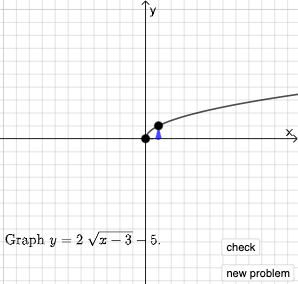
Square Root Function Anatomy: Exploration
This interactive GeoGebra resource demonstrates square root function y=√x and its geometric transformations including translations, stretches, and reflections through a quiz format. Key mathematical concepts covered: coordinate transformation rules of function graphs, relationship between parameters and graph morphology, analysis of domain and range. Construction details: Using Point command to define key coordinates, Line and Segment for axes and auxiliary lines, Polygon for region visualization, Slider animations for dynamic parameter changes, and If conditions for automatic grading. Suitable for middle and high school mathematics courses on functions, graphing, coordinate geometry, and transformation concepts, ideal for classroom demonstration or student self-study.
GeoGebra Commands & Parameters
Point(Segment[(h + 1, y(C) + 10), (h + 1, y(C) - 10)]) → DLine(A, B) → fVector(A, C) → uPolygon(A, C, B) → t1, b, a_1, cRotateText(text2, pi / 2) → text3Segment(A, C) → h_{1}Vector(C, D) → vVector((h, 0), A) → wVector((0, 0), (h, 0)) → jRandomElement({-8, -7, -6, -5, -4, -3, -2, -1, 1, 2, 3, 4, 5, 6, 7, 8}) → nRandom(-8, 8) → oRandom(-8, 8) → pIf(h ≟ o, "Horizontal shift is correct!", "Horizontal shift is not correct.") → text9If(n ≟ rise, "Vertical stretch is correct!", "Vertical stretch is not correct.") → text10If(p ≟ y(A), "Vertical shift is correct!", "Vertical shift is not correct.") → text11
AI Drawing Prompt Reference
Create a transformation quiz diagram for the square root function. Draw the coordinate axes and the base square-root curve, marking key points A, C, and B to represent the important geometric locations. Include auxiliary lines and a line segment from A to C as a height/reference. Show vectors that encode the transformations, such as the direction from A to C and from C to another point, plus an additional construction vector to represent the horizontal component. Add polygons to visualize the transformed region(s) that relate to the curve and its transformations. Add dynamic parameters (sliders) for horizontal shift, vertical stretch, and vertical shift, and display short correctness messages based on comparisons.
The prompt above was compiled from the original drawing commands and is for reference only.