
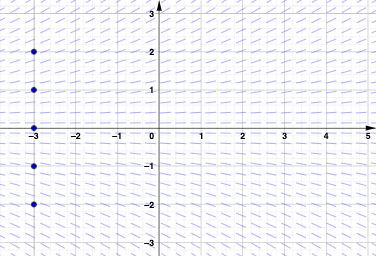
Sketch solution curves with slope fields
Loading the math board and drawing, please wait…
In collections
MATH1052-edX
This example demonstrates how to visualize solution curves of differential equations using slope fields. Key mathematical concepts include differential equations, slope fields, and phase plane analysis. Construction involves GeoGebra commands like SolveODE and SlopeField, using objects such as n, LSF, and others. Suitable for high school students or college undergraduates learning differential equations and phase plane analysis.
GeoGebra Commands & Parameters
SelectedIndex(LSF) → indElement(LSF, n) → eqSolveODE(eq, x(A2), y(A2), 15, 0.01) → B2SolveODE(eq, x(A3), y(A3), 15, 0.01) → B3SolveODE(eq, x(A4), y(A4), 15, 0.01) → B4SolveODE(eq, x(A5), y(A5), 15, 0.01) → B5SolveODE(eq, x(A1), y(A1), 15, 0.01) → B1SlopeField(eq, 26, 1) → SF
AI Drawing Prompt Reference
Create a 2D slope field for a given differential equation in the plane, showing the local direction (slope) of solution curves. Use the equation expression as the basis for the construction. Choose several initial conditions at different starting points, and numerically compute multiple solution curves for the same differential equation starting from those points. Overlay all computed solution curves onto the same slope-field plot so that the curves’ local tangents align with the slope directions indicated by the field. Generate the slope field over the shown range and then place the solution curves on top of it to compare how solutions vary with initial conditions.
The prompt above was compiled from the original drawing commands and is for reference only.