
Sine of Obtuse Angles
Loading the math board and drawing, please wait…
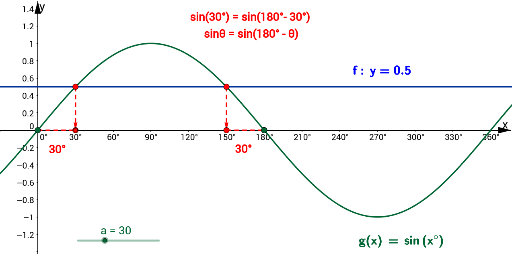
This GeoGebra example demonstrates how the sine of an obtuse angle is constructed and visualized geometrically, emphasizing the relationship between an obtuse angle and its supplementary acute angle. Core mathematical concepts include trigonometry (sine function), obtuse and acute angles, angle measurement, triangle congruence and similarity, and geometric modeling on the unit circle or right triangles. The construction relies on GeoGebra commands LaTeX, Line, Vector, Intersect, Point, and Segment, together with objects such as g, text2, a, A, B, f, C, D, u, v, E, F, G, h, H, i, text1, text3, text4, and text5. Points, lines, segments, vectors, and intersections are used to build the geometric figure step by step. This resource is suitable for middle school and high school mathematics instruction, particularly for classroom demonstrations of the extension of trigonometric definitions to obtuse angles, the geometric interpretation of sine values, and related geometric construction practice.
GeoGebra Commands & Parameters
LaTeX(g, true, true) → text2Line(A, B) → fVector(A, C) → uVector(B, D) → vIntersect(g, xAxis, (0, 0)) → EIntersect(g, xAxis, (180, 1.2246467991473532E-16)) → FPoint(Circle[E, a]) → GSegment(E, G) → hPoint(Circle[D, a]) → HSegment(D, H) → iLaTeX(f, true, true) → text1
AI Drawing Prompt Reference
Create a geometric illustration of an obtuse angle and its supplementary acute angle, showing how the sine of the obtuse angle relates to the sine of the acute angle. Draw a unit circle or right triangle, mark the obtuse angle and its corresponding acute angle, and construct vectors along the sides. Locate the intersection points of the circle with the x‑axis and draw radii to these points. Connect the appropriate points with line segments to form the sine segments, highlighting that the sine lengths are equal for the obtuse and acute angles.
The prompt above was compiled from the original drawing commands and is for reference only.