
Simultaneous Linear Equations (Graphs Plotted using User Input)
Loading the math board and drawing, please wait…
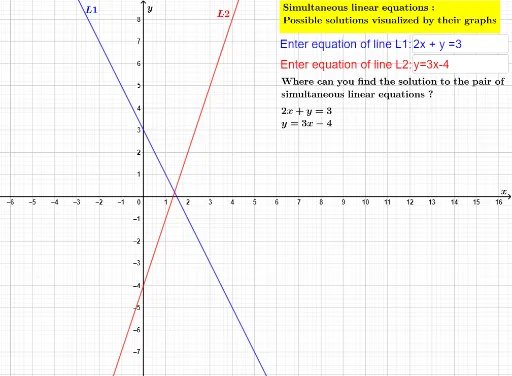
This interactive worksheet allows students to enter any two simultaneous linear equations in two variables x and y. As the user types equations into the input boxes, the corresponding straight lines are plotted on the coordinate plane in real time, and their intersection point is clearly shown. The core mathematical concepts include linear equations, systems of equations, graphing linear functions, and coordinate geometry. The construction uses GeoGebra's Textfield command to create input fields, InputBox objects to capture user text, and then converts the entered equations into line objects L1 and L2, with text labels displayed for clarity. This resource is ideal for middle school and high school students learning algebra and analytic geometry, as well as for teachers demonstrating the graphical solution of simultaneous equations. It helps learners visually connect the algebraic solution to the geometric intersection of two lines, reinforcing conceptual understanding.
GeoGebra Commands & Parameters
Textfield(inputL1txt) → InputBox1Textfield(inputL2txt) → InputBox2