
Simple Example
Loading the math board and drawing, please wait…
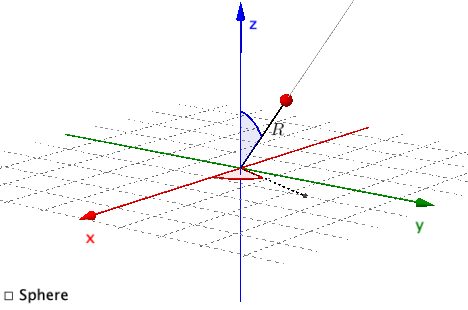
This example demonstrates simple geometric constructions, including lines, rays, angles, and vectors. Commands used include Surface, PointIn, Segment, Ray, Angle, and Intersect. Suitable for middle school and above students to learn geometric construction and vector concepts.
GeoGebra Commands & Parameters
Surface(((r * cos(u)) * sin(v)), ((r * sin(u)) * sin(v)), (r * cos(v)), u, 0, (2 * π), v, 0, π) → sPointIn(Sphere[O, r]) → BSegment(B, O) → s1Ray(O, B) → r1Ray(O, (x(B), y(B), 0)) → r2Angle((100, 0, 0), O, (x(B), y(B), 0)) → thetaAngle((0, 0, 100), O, B) → phiIntersect(r2, Sphere[O, r]) → C,Segment(O, C) → r3
AI Drawing Prompt Reference
Draw a sphere centered at point O. There is a point B on the sphere. Draw a line segment and a ray from O to B. Draw a ray from O to point (x(B), y(B), 0). Construct angles theta and phi. Ray r2 intersects the sphere at point C. Finally, draw a line segment from O to C.
The prompt above was compiled from the original drawing commands and is for reference only.