
Similarity Transformations Definition GeoGebra Demo
Loading the math board and drawing, please wait…
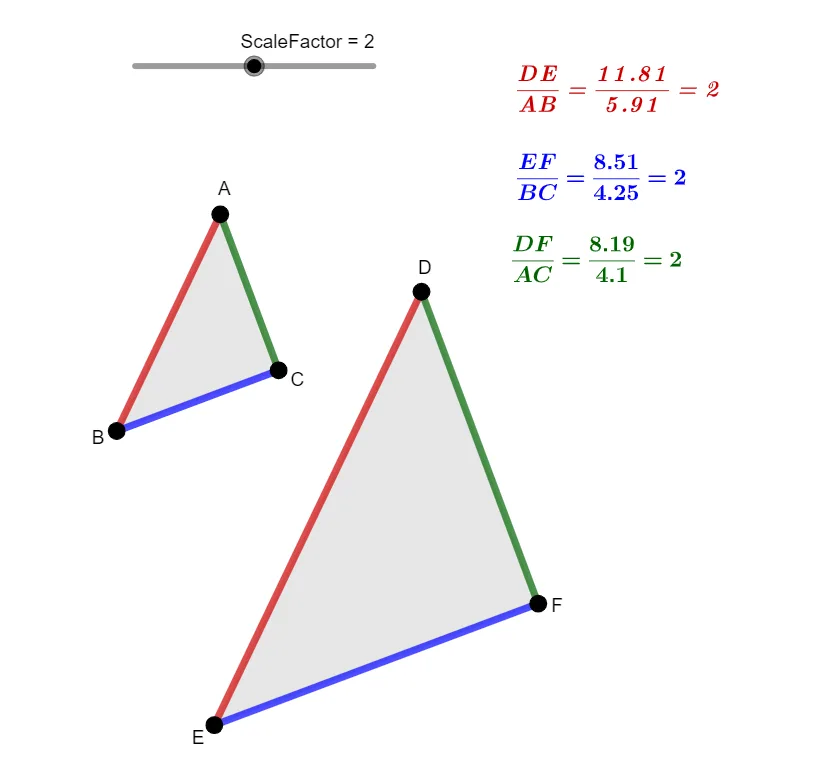
This example dynamically demonstrates how similarity transformations alter the size and shape of polygons while maintaining similarity using GeoGebra. Core math concepts include similarity transformations, ratios, vector transformations, and geometric constructions. Construction highlights involve Polygon command for creating polygons, Dilate for scaling, and Vector/Translate for transformations. Suitable for high school and above learners to understand geometric transformations and similarity.
GeoGebra Commands & Parameters
Polygon(A_{1}, B_{1}, C_{1}) → t1, c, a, bPolygon(D_{1}, E_{1}, F_{1}) → t2, f, d, ePolygon(A, B, C) → t3, AB, BC, ACDilate(A, ScaleFactor, D_{2}) → A'Dilate(B, ScaleFactor, D_{2}) → B'Dilate(C, ScaleFactor, D_{2}) → C'Polygon(A', B', C') → t3', c', a', b'Vector(E_{2}, F_{2}) → uTranslate(A', u) → DTranslate(B', u) → ETranslate(C', u) → FPolygon(D, E, F) → t3'', DE, EF, DF
AI Drawing Prompt Reference
On the same plane, draw two triangles: first, a triangle from three points with its sides AB, BC, and AC; then a second triangle from another three points with its sides DE, EF, and DF. Next, perform a similarity scaling of the first triangle by using a chosen scale factor around a fixed reference point to map its three vertices to three new vertices, and connect them to form the scaled triangle. Finally, create a translation vector from a pair of points of the second triangle, translate the three scaled vertices by that vector to obtain three translated points, and connect them to form the translated triangle.
The prompt above was compiled from the original drawing commands and is for reference only.