
Properties of Dilating Line Segments
Loading the math board and drawing, please wait…
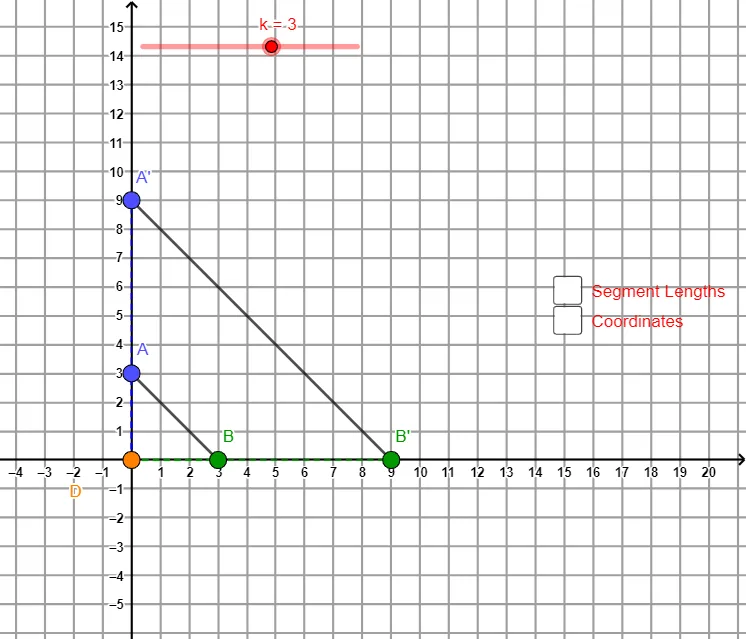
This example demonstrates the geometric properties of line segment dilation (similarity transformation). When segment AB is dilated about a fixed center point, observe how the position relationship, length ratio, and geometric properties change before and after dilation. Key mathematical concepts include similarity transformation, scale factor, center of dilation, and segment length ratio. Construction: Use Segment command to create base segment AB, apply Dilate command with different scale factors k about a specified center to construct dilated segment A'B', and quantitatively analyze the length relationship by calculating CoDvalue, ABvalue, A'B'value and other data. Suitable for middle and high school mathematics teaching on similarity, homothetic transformation, and proportional segments, also serves as preparation for understanding limiting states of conic sections.
GeoGebra Commands & Parameters
Segment(A, B) → ABDilate(A, k, CoD) → A'Dilate(B, k, CoD) → B'Segment(A', B') → A'B'Segment(CoD, A) → ACoDvalueSegment(CoD, A') → A'CoDvalueSegment(CoD, B) → BCoDvalueSegment(B', CoD) → B'CoDvalueSegment(CoD, A) → ACoDSegment(CoD, A') → A'CoDSegment(CoD, B') → B'CoDSegment(CoD, B) → BCoDSegment(A, B) → ABvalueSegment(A', B') → A'B'value
AI Drawing Prompt Reference
Draw a line segment AB and set a slider k for the scale factor. Dilate segment AB about a fixed point with different values of k to obtain segment A'B'. Draw lines from the center to points A, A', B, and B', and calculate the lengths to show the ratio of segment lengths before and after dilation in relation to the scale factor, demonstrating the properties of similarity transformation.
The prompt above was compiled from the original drawing commands and is for reference only.