
Similar Triangles and Circle Construction
Loading the math board and drawing, please wait…
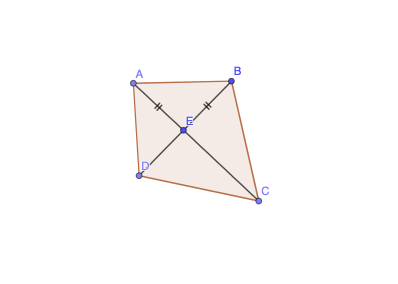
This example demonstrates the properties of similar triangles and circle constructions. It involves key mathematical concepts such as similar triangles, circle properties, and coordinate geometry. Using GeoGebra commands like Circle, Line, Point, Polygon, Segment, etc., a series of geometric shapes can be constructed. Suitable for middle and high school students to learn about similar triangles and circles.
GeoGebra Commands & Parameters
Circle(E, B) → cLine(B, E) → fPoint(c) → ALine(E, A) → gPoint(f) → DPoint(g) → CPolygon(B, A, D, C) → q1, b, c_1, d, eSegment(A, E) → hSegment(E, B) → iSegment(E, C) → jSegment(E, D) → k
AI Drawing Prompt Reference
Start by drawing a circle with one point as its center and another point on its circumference. Draw a line through these two points. Pick a point on the circle, and connect it to the center to form a ray. Choose a point on the line and another point on the ray. Connect the four points (the circle point, the line point, the ray point, and the center) in order to form a quadrilateral. Finally, draw four segments from the center to each vertex of the quadrilateral. The figure shows a circle, a diameter line, a radius ray, and an inscribed quadrilateral with center connections, illustrating similar triangles and circle properties.
The prompt above was compiled from the original drawing commands and is for reference only.