
Shapes with Same Area
Loading the math board and drawing, please wait…
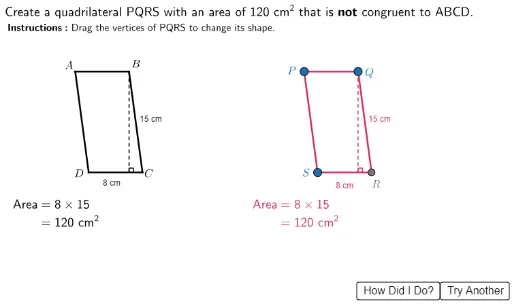
This example demonstrates how different geometric shapes can have the same area. It involves core math concepts like area calculation, statistical characteristics, line segments, Pythagorean theorem, integral calculus, and arithmetic mean. The construction uses commands such as Line, Intersect, Point, Join, Segment, Angle, and Rotate from GeoGebra. It is suitable for high school students studying geometry and calculus to understand the relationship between area and shape.
GeoGebra Commands & Parameters
Line(A, B) → hLine(D, h) → iLine(A, D) → fLine(B, f) → gIntersect(i, g) → CPoint(GridSpaceQ) → QJoin(Sequence[Sequence[(i, j), i, 34, 74, 1], j, 12, 32, 1]) → GridSpacePoint(GridSpace) → PLine(P, Q) → jPoint(GridSpace) → SLine(S, j) → kLine(P, S) → lLine(Q, l) → mIntersect(m, k) → RSegment(S, R) → RSSegment(C, D) → CDSegment(A, B) → ABSegment(B, C) → BCSegment(D, A) → DASegment(Q, P) → PQSegment(R, Q) → QRSegment(P, S) → SPPoint(GridSpace) → P2Point(GridSpace) → Q2Segment(A2, B2) → AB2Segment(B2, C2) → BC2Segment(C2, A2) → CA2Segment(P2, Q2) → PQ2Point(GridSpaceR) → R2Segment(Q2, R2) → QR2Segment(R2, P2) → RP2Intersect(OrthogonalLine[A2, Line[B2, C2]], Line[B2, C2]) → H2TriSegment(H2Tri, H1Tri) → HeightDisp1TriIntersect(OrthogonalLine[P2, Line[Q2, R2]], Line[Q2, R2]) → H4TriSegment(H4Tri, H3Tri) → HeightDisp2TriIntersect(OrthogonalLine[B, Line[C, D]], Line[C, D]) → H2QuadIntersect(OrthogonalLine[Q, Line[R, S]], Line[R, S]) → H4QuadSegment(H2Quad, H1Quad) → HeightDisp1QuadSegment(H4Quad, H3Quad) → HeightDisp2QuadSegment(H4Tri, Q2) → HeightDispHoriz2TriSegment(H2Tri, B2) → HeightDispHoriz1TriSegment(H4Quad, S) → HeightDispHoriz2QuadSegment(H2Quad, C) → HeightDispHoriz1QuadAngle(A2, H2Tri, C2) → Ang1TriAngle(P2, H4Tri, R2) → Ang2TriAngle(B, H2Quad, C) → Ang1QuadAngle(Q, H4Quad, R) → Ang2QuadRotate(A2, 2, B2) → A2'Angle(C2, B2, A2) → AngABCRtTriAngle(A, B, C) → AngABCRtQuadAngle(A2, C2, B2) → AngACBRtTriAngle(R2, Q2, P2) → AngPQRRtTriAngle(Q2, R2, P2) → AngPRQRtTriAngle(P, Q, R) → AngPQRRtQuad
AI Drawing Prompt Reference
Draw a quadrilateral ABCD and a triangle PQR with the same area. Start by drawing the quadrilateral ABCD, then draw line segments PQ and RS connecting the diagonals of the quadrilateral. Next, draw triangle PQR to ensure its area matches the quadrilateral. Finally, use rotations and calculations to ensure the heights and angles of the triangle and quadrilateral are correct, forming shapes with equal areas.
The prompt above was compiled from the original drawing commands and is for reference only.