
Hyperbola - Semiaxes
Loading the math board and drawing, please wait…
In collections
The GeoGebra's Toolbox for Teachers and Students
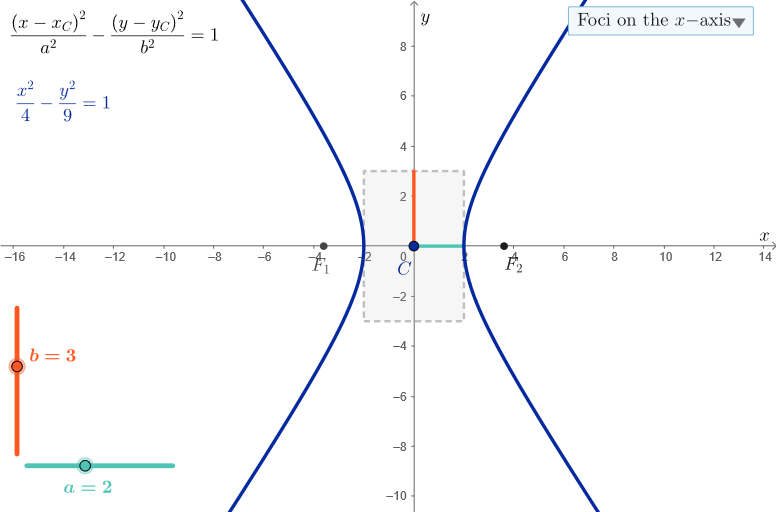
This GeoGebra example demonstrates the basic properties of hyperbolas, including the concept of semiaxes. It involves core math concepts such as hyperbolas, coordinate geometry, and geometric construction. The example uses GeoGebra commands and objects, such as Segment, Polygon, SelectedIndex, and Focus, to construct the hyperbola graph. This example is suitable for middle school or high school students learning the basic concepts and properties of hyperbolas.
GeoGebra Commands & Parameters
Segment(C, C + (a, 0)) → horSemiSegment(C, C + (0, b)) → verSemiSegment(C, C - (0, b)) → verSemiNSegment(C, C - (a, 0)) → horSemiNPolygon({(x(C) - a, y(C) - b), (x(C) + a, y(C) - b), (x(C) + a, y(C) + b), (x(C) - a, y(C) + b)}) → q1SelectedIndex(ddMenu) → isFocus(If[is ≟ 1, k, eq1]) → F1, F2
AI Drawing Prompt Reference
Draw a hyperbola, marking its center, transverse and conjugate axes, and the rectangle formed by the axes. Then, based on a dropdown menu selection, draw two foci on both sides of the center and connect the center to the foci to form the focal lines of the hyperbola.
The prompt above was compiled from the original drawing commands and is for reference only.