
Shape in a Rhombus: Circle, Kite, and Rotation
Loading the math board and drawing, please wait…
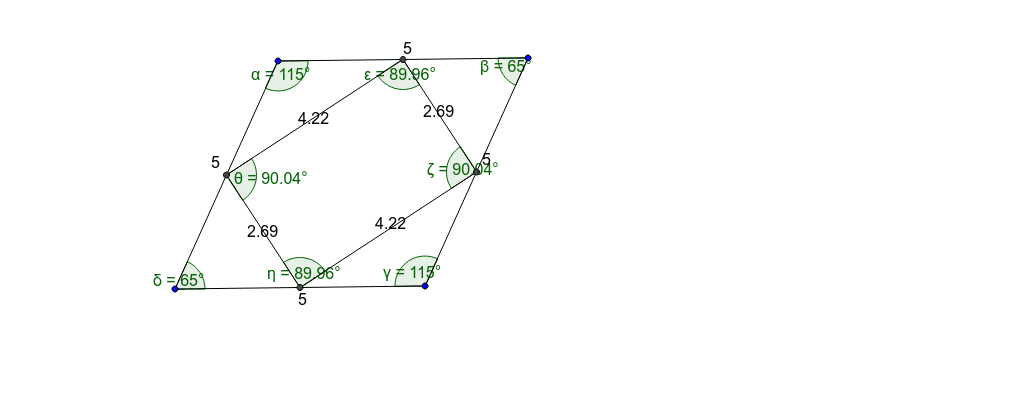
This GeoGebra example demonstrates a composite geometric figure inside a rhombus, featuring a circle, a kite, and rotational relationships. It visually explores how multiple geometric elements interact within the rhombus framework. Core mathematical concepts include properties of a rhombus (equal sides, perpendicular bisecting diagonals), circle definitions and tangency, kite symmetry, rotational symmetry, and angle relationships. Construction details: using GeoGebra commands Segment, Angle, and Midpoint, the vertices A, B, C, D and sides a, b, c, d are created, along with angles α, β, γ, δ. Interior points E, F, G, H and segments e, f, g, h are then constructed, with angles ε, ζ, η, θ labeled, forming a complete figure through rotation and symmetry. Suitable for middle and high school geometry classes, this example helps students investigate properties of inscribed shapes, rotational symmetry, and angle calculations, and serves as a dynamic geometry experiment.
GeoGebra Commands & Parameters
Segment(A, D) → aSegment(D, C) → bSegment(C, B) → cSegment(A, B) → dAngle(B, A, D) → αAngle(A, D, C) → βAngle(D, C, B) → γAngle(C, B, A) → δMidpoint(A, D) → EMidpoint(D, C) → FMidpoint(C, B) → GMidpoint(B, A) → HSegment(E, F) → eSegment(F, G) → fSegment(G, H) → gSegment(H, E) → hAngle(H, E, F) → εAngle(E, F, G) → ζAngle(F, G, H) → ηAngle(G, H, E) → θ
AI Drawing Prompt Reference
Draw a rhombus first, then inscribe a circle and a symmetrical quadrilateral (kite shape) inside it, and rotate this quadrilateral around a central point. Start by drawing the four sides of the rhombus and marking the angles at each corner. Then, find the midpoints of the rhombus and use these midpoints to draw an internal quadrilateral. Finally, rotate this quadrilateral around one of the rhombus's vertices to create a symmetrical figure.
The prompt above was compiled from the original drawing commands and is for reference only.